

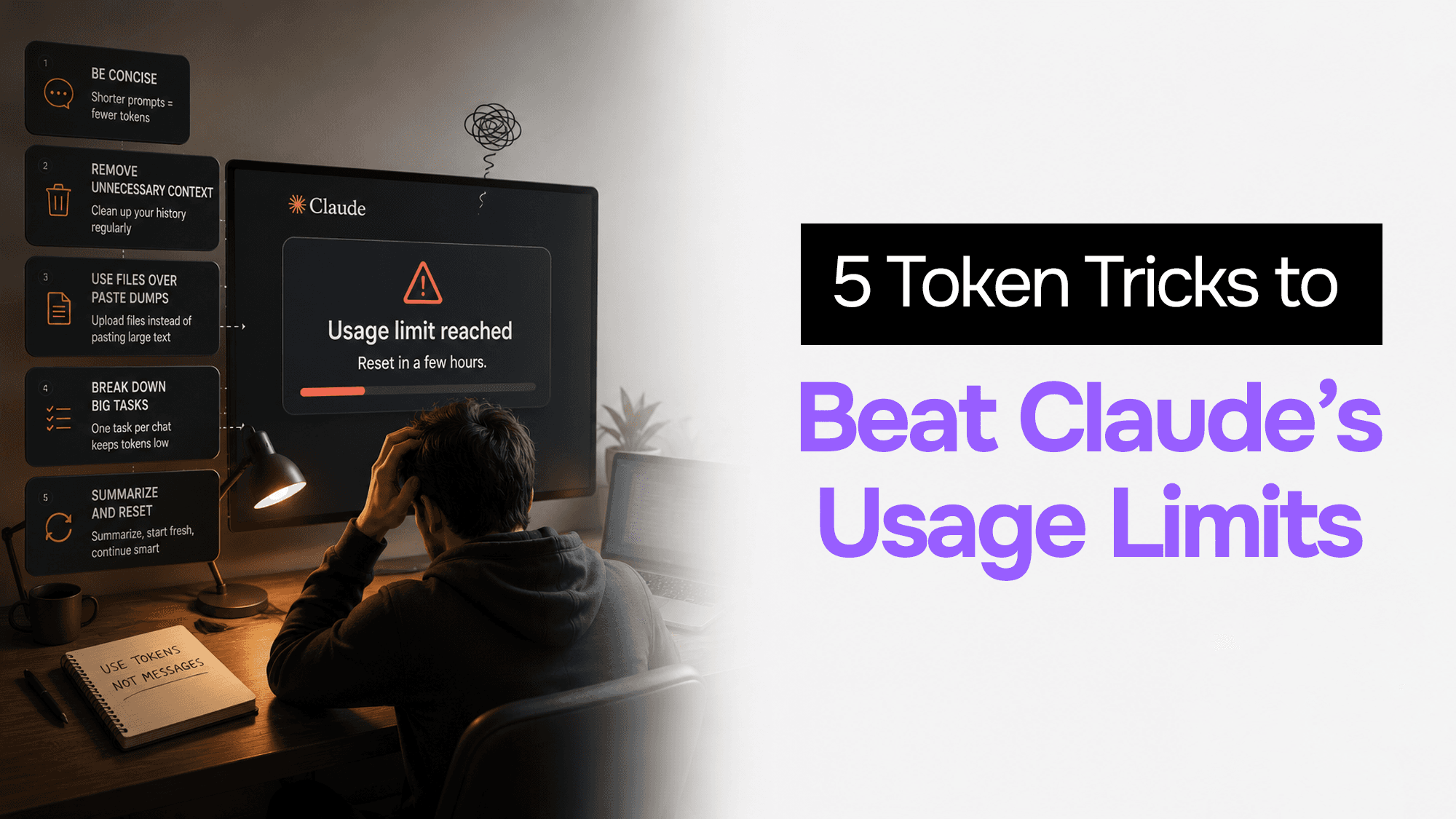
Why You Keep Hitting Claude's Usage Limits (And 5 Token Tricks That Actually Fix It)
You're mid-conversation with Claude, the replies are getting good, and then — usage limit reached. Reset in a few hours.
If this is happening frequently and you're on a paid plan, the problem isn't Claude. It's that you're using it the same way you use ChatGPT, and Claude's limit system works completely differently.
Here's the short version: Claude doesn't count messages. It counts tokens — and every single message you send costs the entire conversation history, all over again.
Once you understand that, five changes cut your limit issues dramatically. I've used these daily in my own AI work and the difference is significant.
The Token Problem Nobody Explains Properly
Most people assume all messages cost roughly the same. They don't.
When you send message #1, Claude processes your message and generates a reply. Cost: roughly 200–500 tokens.
When you send message #30, Claude re-reads your entire conversation — all 29 previous exchanges, both sides — then processes your new message, then generates a reply. Cost: 40,000–50,000 tokens. Same question, 220× more expensive.
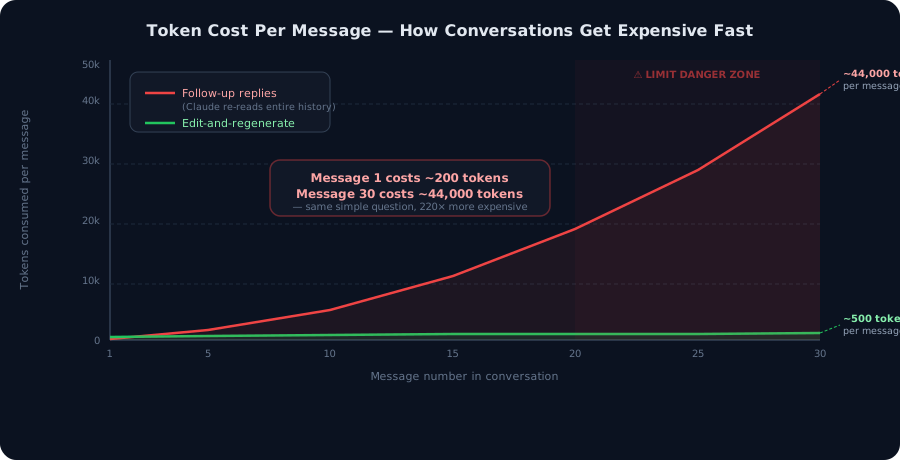 Chart showing how token cost per message grows exponentially through a conversation
This isn't a bug. It's how transformer models work — they need full context to respond coherently. But it means your limit isn't really about messages at all. A 30-message conversation can consume more of your budget than 50 short, fresh conversations.
There's a second thing most posts get wrong: Claude's limits are cost-based, not count-based. Anthropic's usage limit tracks the cost of tokens you generate, and the cost per token varies dramatically by model:
- Haiku: baseline (call it 1×)
- Sonnet: roughly 3–5× more expensive than Haiku
- Opus: roughly 5–10× more expensive than Haiku
A single Opus conversation burns your budget at the same rate as 5–10 Haiku conversations. This matters enormously when choosing which model to reach for.
5 Tricks That Actually Fix It
1. Edit Your Prompt — Don't Send a Follow-Up
This is the highest-leverage change you can make, and most people never do it.
When Claude misses the mark, the natural instinct is to send a follow-up: "Actually, make it shorter." "Can you try a different angle?" "That's not quite right — try again."
Every follow-up adds another turn to your conversation history. By the time you've sent 10 follow-ups, you're paying for 10 rounds of full history re-reads on every exchange.
The fix: Click Edit on your original message, adjust it, and regenerate. The old response gets replaced rather than stacked on top. Your conversation stays at one exchange instead of twelve.
Over a 10-round correction cycle, this alone cuts your token usage by 80–90%. If you're doing any kind of iterative content writing, code generation, or analysis with Claude, this is the most important habit change on this list.
Where to find it: Hover over any message you sent. You'll see an edit icon (pencil). Click it, revise, hit Enter. The thread gets trimmed to that point.
2. Start a Fresh Chat Every 15–20 Messages
The token accumulation problem compounds fast. Once you're past message 20, every exchange costs significantly more than it did at the start — and you start noticing response quality dipping too (researchers call this "context rot": accuracy and recall degrade as context grows long).
The fix: Open a fresh conversation every 15–20 exchanges for new topics or phases of work. Before you do:
- Ask Claude: "Summarise our key decisions and context in 200 words."
- Copy that summary.
- Open a new chat, paste it as your opening message.
You've reset the token clock while keeping all the relevant context. The fresh conversation starts at 200 tokens instead of 40,000+.
Pro tip: Claude's reset cycle is a 5-hour rolling window, not a daily reset. Messages expire as the 5-hour mark passes, which means starting fresh mid-session often gives you more immediate headroom than waiting.
3. Use the Right Model for Every Task
The single highest-impact change to your token budget — and the one most people ignore — is choosing the right model rather than always defaulting to Sonnet or Opus.
Claude has three tiers with very different cost profiles:
| Model | Best for | Relative cost |
|---|---|---|
| Haiku | Quick answers, formatting, grammar, brainstorming, summarising | 1× |
| Sonnet | Content writing, analysis, most coding tasks | 3–5× |
| Opus | Deep research, hard logic, complex reasoning, long-horizon tasks | 5–10× |
Using Haiku all day for tasks that don't need Sonnet's depth frees up 50–70% of your budget for the work that genuinely needs a more capable model.
Practical split I use:
- "Fix the grammar in this paragraph" → Haiku
- "Write a 1,000-word blog post on X" → Sonnet
- "Audit this architecture decision and find edge cases" → Opus (only when Sonnet's first pass wasn't enough)
Don't use Opus by default. Switch it on only when a simpler model's output genuinely wasn't good enough.
4. Set Up Memory and User Preferences (Once)
Every conversation you start without stored context burns 3–5 setup messages just re-establishing who you are, what you're working on, and how you like responses formatted. If you have 10 conversations per day, that's potentially 50 wasted setup messages.
The fix: Go to Settings → Memory (on Claude.ai) and store it once:
- Your role and what you do
- Your preferred response style (concise vs. detailed, tone, format)
- Recurring context (the project you're working on, your tech stack, your audience)
- Things Claude should always or never do
Claude carries this into every new conversation automatically. You eliminate the entire setup overhead.
If you're doing ongoing project work, Claude Projects go further. Projects use retrieval-augmented generation (RAG), meaning Claude doesn't load your entire project knowledge base into the active context window — it pulls in only the relevant pieces when needed. For anything with sustained context over days or weeks, Projects are dramatically more token-efficient than long threads.
5. Turn Off Features You're Not Using
Several Claude features add tokens to every response, whether you're actively using them or not:
- Web search — adds search results and source reading to every response
- Research mode — significantly deeper (and more expensive) than standard responses
- Extended Thinking — visible reasoning steps that consume substantial tokens before the actual answer
- Connected tools (calendar, email, Slack integrations) — adds connector queries to context
These are powerful when you need them. When you don't, they're silent token drains.
The fix: Keep all of these off by default. Turn them on intentionally for specific tasks that genuinely need them.
Extended Thinking in particular is worth being deliberate about. Leave it off. Try the standard response first. If the reasoning quality isn't good enough for your specific task, then switch it on. For most everyday tasks — writing, summarising, formatting, simple coding — standard mode is sufficient and costs a fraction as much.
Bonus: Batch Your Questions
This one is quick but impactful: instead of sending three separate messages ("Summarise this," then "List the key points," then "Write a headline"), send them together in one message.
Claude loads conversation context once per message. Three questions sent separately = three context loads. Three questions in one message = one context load. For long conversations, this adds up.
Write something like:
"Please do three things: 1) Summarise the article I've pasted below in 3 sentences. 2) List the 5 key points as bullets. 3) Suggest 3 headline options."
One message. One context load. Same output.
Quick Reference
| Habit | Token savings |
|---|---|
| Edit instead of follow-up | 80–90% over 10 rounds |
| Fresh chat every 15–20 messages | Resets your cost baseline |
| Haiku for simple tasks | 70–90% vs Opus for same task |
| Memory + preferences setup | Eliminates 3–5 setup messages per chat |
| Features off by default | Removes passive token drain |
| Batch multiple questions | 2–3× fewer context loads |
Why This Matters Beyond the Budget
There's a performance argument here beyond the limit frustration. Shorter, focused conversations produce better responses than bloated 40-turn threads. Context rot is real — when Claude is re-reading 50,000 tokens of conversation history, the quality of its attention degrades. Fresh conversations with well-structured context outperform long threads even when the limit isn't a factor.
The habits above don't just protect your budget. They produce better outputs.
FAQ
Does this apply to Claude API users too?
Yes, but the mechanism is different — API usage is billed directly by token. The same habits apply: shorter contexts, right-sized models, and editing rather than following up all reduce your API bill directly.
What's the actual limit on Claude Pro?
Anthropic doesn't publish a fixed number because limits are cost-based and adjust based on current demand. Usage resets on a 5-hour rolling window. Claude's usage settings page (claude.ai/settings/usage) shows your current consumption in real time.
Is Claude Max worth it?
Claude Max (the higher tier above Pro) gives significantly more headroom. If you're hitting Pro limits consistently despite the tricks above, it may be the right move — but try the habits first. Many people on Pro never hit their limits once they switch to editing rather than following up and stop defaulting to Opus for everything.
Does Projects help with limits?
Yes, significantly for ongoing work. Projects use RAG to pull only relevant context rather than loading everything, which keeps your active context window much smaller. If you have recurring work with stable context (the same codebase, the same research topic, the same client), use a Project.
Vibe Coding Survival Guide
How to Ship AI-Assisted Code That Doesn't Embarrass You in Production
A production-minded guide for developers, founders, and teams using AI coding tools without letting brittle generated code reach customers.
If you found this article helpful, consider buying me a coffee to support more content like this.
Related Articles
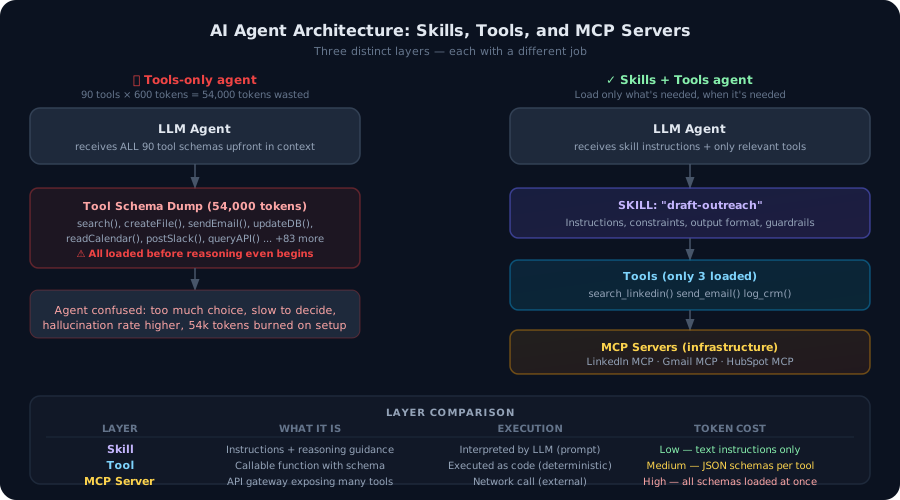
Most developers build agents with tools. That's not enough. Here's the architectural difference between agent tools and agent skills — and why getting this wrong burns tokens, degrades accuracy, and makes your agents brittle in production.

Learn how I wrapped the Hacker News API into a modular, LLM-ready MCP server with Zod contracts and OpenAPI support using zod-openapi.

AI chatbot development services explained: how they work, rule-based vs AI, cost, ecommerce use cases, and how to choose the right development partner.
Vibe Coding Survival Guide
How to Ship AI-Assisted Code That Doesn't Embarrass You in Production
A production-minded guide for developers, founders, and teams using AI coding tools without letting brittle generated code reach customers.