

One AI Agent Is Never Enough. Here's How to Split the Work Right.
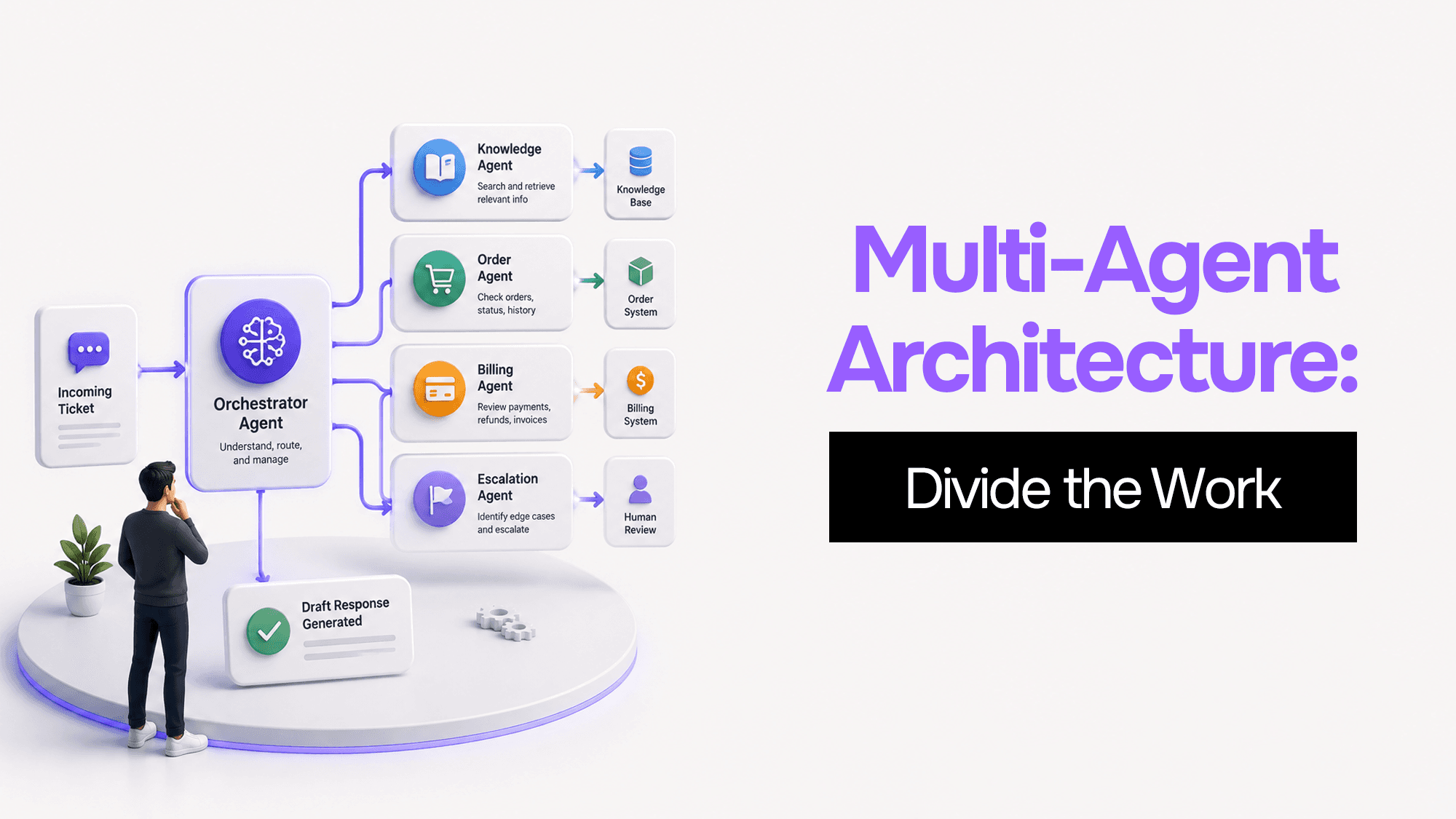
A client came to me last year with a support automation system they had spent three months building. The demo had been flawless — a single GPT-4 agent that read incoming tickets, checked their knowledge base, queried their order management system, drafted replies, and flagged edge cases for human review.
Two weeks after going live, it started breaking in ways they hadn't anticipated.
Tickets from early in a long thread would get contradicted later in the same response. The agent would suggest solutions it had already tried and discarded. Processing time climbed from four seconds to forty as the thread history grew. And because the agent needed access to everything — orders, billing, shipping, customer notes — a single malformed ticket could potentially send it somewhere unintended.
None of these were bugs in the traditional sense. They were features of a system that had hit its architectural limits. The team kept asking "why is it getting dumber?" when the real question was "why did we expect one model to hold all of this in its head at once?"
This post is about the answer to that second question — and the four patterns that let you fix it.
The Three Walls a Single Agent Hits
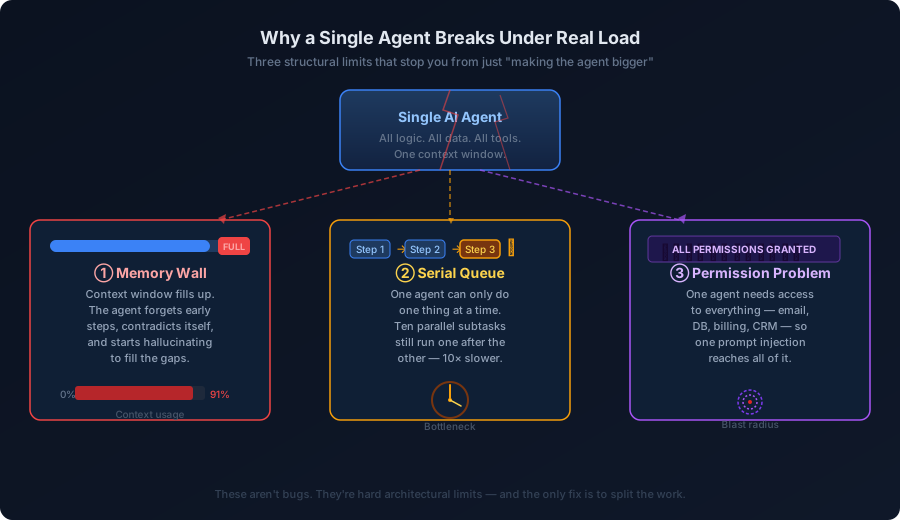
Before I get into patterns, it helps to understand exactly what breaks and why. These aren't random failure modes. They're predictable consequences of using a single model for a task it structurally cannot handle.
 Why a Single Agent Breaks Under Real Load
The Memory Wall
Language models do not have persistent memory. Everything they know about a conversation lives inside the context window — a fixed-size buffer of tokens that they can "see" at once. Once that fills up, the model starts dropping older content to make room. But it doesn't tell you it's doing this. It just starts contradicting itself.
In my client's support system, threads with more than eight or nine exchanges would hit this wall. The agent would forget that it had already checked the order status, ask the customer the same question twice, or propose a refund that it had already declined twenty messages earlier.
The instinct is to use a bigger context window. You can, but it's not a fix — it's a delay. A 128k token window is bigger than a 32k one, but it's still a wall. And there's a secondary problem: attention degrades toward the middle of a long context. Information in the first and last few thousand tokens gets weighted more heavily. Stuff in the middle gets "forgotten" even when it's technically still in the window.
The Serial Queue
A single agent executes one step at a time. If you need to check inventory, check the customer's order history, check your return policy, and draft a response, those four things happen in sequence — even if they have nothing to do with each other.
For simple tasks this is fine. For anything complex, it's brutal. My client's agent was doing eight to ten lookups per ticket. Run them sequentially at 800ms per call and you're looking at eight-plus seconds before the model even starts writing. That's before you account for the generation itself.
The deeper problem is structural: no matter how fast the underlying model gets, serial execution means you cannot do better than the sum of every step's latency. There is no optimization path within a single agent that fixes this.
The Permission Problem
This one is the most dangerous and the least discussed.
When you give one agent access to everything it might need — your CRM, your billing database, your customer email, your internal Slack — you're also creating a single point of failure for your security boundary. A well-crafted adversarial prompt in a ticket body could, in theory, cause that agent to leak data it was never meant to touch, or trigger an action in a system it should never be writing to.
The principle of least privilege exists in software security for a reason. Your email-reading agent should not have write access to your billing database. Your report-writing agent does not need access to your HR system. But with a single agent that does everything, you have no real way to enforce this. You just have to trust that the model will behave.
Multi-agent architectures let you isolate permissions at the boundary. The agent that reads email cannot write to billing. The agent that processes billing cannot read email. The blast radius of a mistake shrinks to the scope of the agent that made it.
Four Patterns That Work in Production
These patterns are not theoretical. I've used or helped teams implement each of them in real production systems. They share one trait: they're not about making AI smarter. They're about designing the system so each agent only needs to be good at one small thing.
Pattern 1: The Coordinator
Think of a head chef in a restaurant kitchen. They don't cook the pasta, sear the fish, and make the dessert themselves. They take the order, figure out what needs to be done, tell each station what to cook, and assemble the final plate when everything comes back.
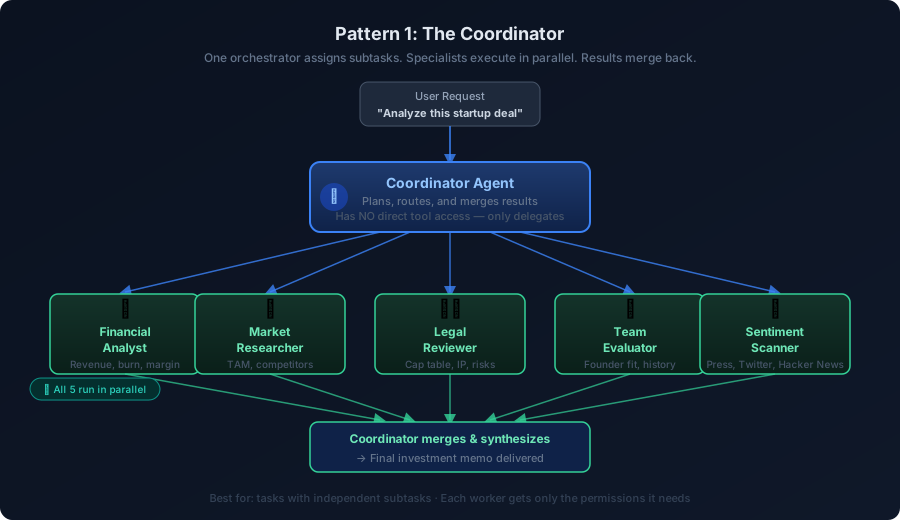
The Coordinator pattern works exactly this way. One orchestrator agent receives the task, breaks it into subtasks, dispatches each to a specialist, and merges the results into a final output.
 The Coordinator Pattern
The critical design rule: the coordinator should have no direct tool access. It only reads the incoming task and produces subtask assignments. This sounds restrictive but it's actually what makes the pattern safe — the orchestrator can't accidentally modify your database because it has no path to your database.
Here's a minimal Node.js implementation of the coordinator loop:
interface SubTask {
  id: string;
  agent: "financial" | "market" | "legal" | "team" | "sentiment";
  payload: Record<string, unknown>;
}

interface CoordinatorResult {
  subtasks: SubTask[];
  mergeStrategy: "all-required" | "majority-vote" | "first-success";
}

async function coordinatorAgent(
  userTask: string
): Promise<Record<string, unknown>> {
  // Step 1: Coordinator plans — no tools, just reasoning
  const plan = await llm.complete({
    system: `You are a coordinator. Break the task into subtasks for specialist agents.
             Output JSON: { subtasks: SubTask[], mergeStrategy: string }
             You have NO tool access. Only plan.`,
    user: userTask,
  });

  const { subtasks, mergeStrategy }: CoordinatorResult = JSON.parse(
    plan.content
  );

  // Step 2: Dispatch all subtasks in parallel
  const results = await Promise.all(
    subtasks.map(async (subtask) => {
      const specialist = getSpecialistAgent(subtask.agent);
      return specialist.run(subtask.payload);
    })
  );

  // Step 3: Coordinator synthesizes — still no tools
  const synthesis = await llm.complete({
    system: "You are a coordinator. Merge these specialist results into a final answer.",
    user: JSON.stringify({ originalTask: userTask, results }),
  });

  return JSON.parse(synthesis.content);
}

function getSpecialistAgent(name: string) {
  const agents: Record<string, { run: (p: Record<string, unknown>) => Promise<unknown> }> = {
    financial: financialAnalystAgent, // has DB read access only
    market: marketResearchAgent, // has web search only
    legal: legalReviewAgent, // has document read only
    team: teamEvaluatorAgent, // has LinkedIn API only
    sentiment: sentimentAgent, // has news API only
  };
  return agents[name];
}
Each specialist agent gets exactly the tools it needs — nothing more. The financial analyst reads the database. The market researcher hits a search API. Neither one touches the other's data.
When to use it: You have a task that naturally decomposes into parallel subtasks. Examples: investment research, competitive analysis, multi-source report generation, any workflow where you're aggregating information from several unrelated systems.
Pattern 2: The Pipeline
The hospital emergency room runs on a pipeline. You arrive, get triaged, get assessed by a nurse, see a doctor, get tests ordered, get results interpreted, get treatment. Each stage has a defined input, defined output, and defined exit conditions. A patient who shouldn't be in the ER at all is redirected early. One who needs surgery bypasses the minor-injury track.
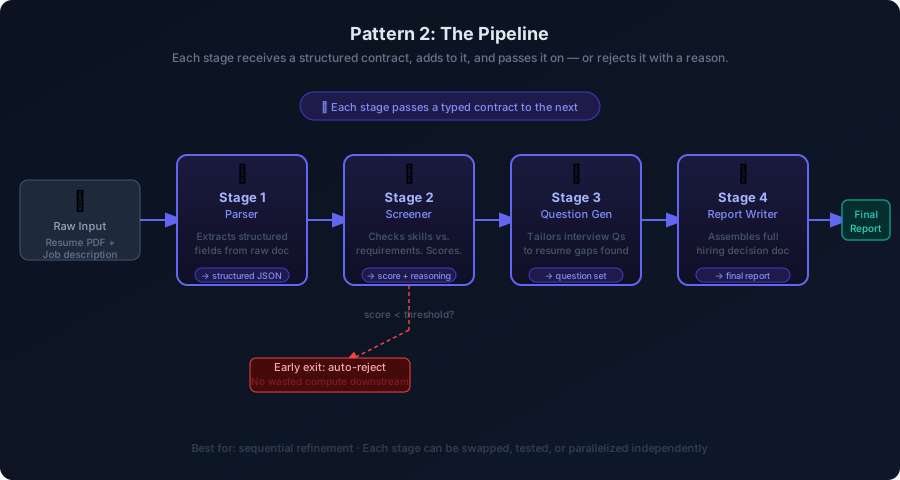
In the Pipeline pattern, each agent is a stage. It receives a typed contract from the previous stage, does its specific job, enriches the contract, and passes it forward. If it can't proceed — quality too low, required field missing, score below threshold — it rejects the contract and the pipeline stops cleanly without wasting compute on downstream stages.
 The Pipeline Pattern
interface PipelineContract {
  raw: string;
  parsed?: ParsedResume;
  score?: number;
  rejection?: { stage: string; reason: string };
  questions?: string[];
  report?: string;
}

const stages: Array<(c: PipelineContract) => Promise<PipelineContract>> = [
  parserStage,    // raw → parsed
  screenerStage,  // parsed → scored (exits early if score < 60)
  questionStage,  // scored → questions tailored to gaps found
  reportStage,    // questions → final hiring recommendation
];

async function runPipeline(raw: string): Promise<PipelineContract> {
  let contract: PipelineContract = { raw };

  for (const stage of stages) {
    contract = await stage(contract);

    // Any stage can reject the contract — that stops the pipeline
    if (contract.rejection) {
      console.log(
        `Pipeline exited at ${contract.rejection.stage}: ${contract.rejection.reason}`
      );
      break;
    }
  }

  return contract;
}

async function screenerStage(
  contract: PipelineContract
): Promise<PipelineContract> {
  const result = await llm.complete({
    system: `Score this resume 0-100 against the job requirements.
             Output: { score: number, gaps: string[], recommendation: string }`,
    user: JSON.stringify(contract.parsed),
  });

  const { score, gaps } = JSON.parse(result.content);

  if (score < 60) {
    return {
      ...contract,
      rejection: {
        stage: "screener",
        reason: `Score ${score}/100 below threshold. Key gaps: ${gaps.join(", ")}`,
      },
    };
  }

  return { ...contract, score };
}
The typed contract is what makes this reliable. Every stage knows exactly what it will receive. If a stage produces garbage output, the type system catches it before it propagates forward. You don't end up with a broken chain where the fourth stage fails mysteriously because the second stage returned slightly different JSON than expected.
When to use it: Tasks where each step transforms the output of the previous step. Examples: document processing workflows, multi-stage content generation, data enrichment pipelines, any workflow where early-exit logic saves significant cost.
Pattern 3: Team of Teams
When a task is genuinely large — a full due diligence report, a complete engineering audit, a multi-department operational review — a flat list of specialists starts to break down. The coordinator is making decisions about too many moving parts. The number of results to synthesize becomes overwhelming.
The Team of Teams pattern adds a second level: each domain gets its own coordinator (a sub-coordinator), and those sub-coordinators report to a top-level orchestrator. The top orchestrator doesn't know or care about the internal structure of each team. It just assigns work to sub-coordinators and receives completed sections back.
Think of a consulting firm responding to a complex RFP. The engagement partner doesn't do the financial modelling, the market analysis, or the technical assessment themselves. They assign each to a team lead. Each team lead manages their analysts. The partner synthesizes the leads' summaries.
Top Orchestrator
├── Financial Team Coordinator
│   ├── Revenue Analyst Agent
│   ├── Risk Assessment Agent
│   └── Benchmarking Agent
├── Technical Team Coordinator
│   ├── Architecture Review Agent
│   ├── Security Audit Agent
│   └── Scalability Agent
└── Market Team Coordinator
    ├── Competitive Analysis Agent
    ├── Customer Research Agent
    └── TAM Estimation Agent
Each team has internal parallelism. Each team coordinator handles its own synthesis. The top orchestrator sees clean summaries, not raw data dumps. The system scales horizontally because you can add teams without touching the other teams' logic.
When to use it: Large research or analysis tasks with clearly delineated domain boundaries. Tasks that would overwhelm a single coordinator's synthesis capability. Workflows where different teams need genuinely different permissions.
Pattern 4: The Notice Board
The three patterns above are all top-down. Someone plans the work and assigns it. But some problems don't have a clear structure up front.
Imagine a detective agency. The lead detective doesn't start a case by assigning specific tasks to specific people. She puts everything she knows on the whiteboard — the timeline, the suspects, the open questions. Whoever on the team has the relevant skill picks up the thread. When they find something new, they add it to the board. The investigation evolves as information comes in.
The Notice Board pattern works the same way. A shared state object acts as the board. Agents read from it, claim tasks, do work, and write their results back. There's no orchestrator telling anyone what to do. The system is self-organising.
interface NoticeBoard {
  state: Record<string, unknown>;
  pendingTasks: Task[];
  completedTasks: CompletedTask[];
  claimedTasks: Map<string, string>; // taskId → agentId
}

interface Task {
  id: string;
  type: string;
  payload: unknown;
  priority: number;
  dependsOn?: string[]; // task IDs that must complete first
}

async function agentLoop(
  board: NoticeBoard,
  agentId: string,
  agentCapabilities: string[]
): Promise<void> {
  while (true) {
    // Find an unclaimed task this agent can handle
    const task = board.pendingTasks.find(
      (t) =>
        agentCapabilities.includes(t.type) &&
        !board.claimedTasks.has(t.id) &&
        (t.dependsOn ?? []).every((dep) =>
          board.completedTasks.some((c) => c.id === dep)
        )
    );

    if (!task) {
      await sleep(500); // nothing to claim, wait
      continue;
    }

    // Claim it atomically (use Redis or a DB in production — not just in-memory)
    board.claimedTasks.set(task.id, agentId);

    const result = await runTask(task, board.state);

    // Write result back and update shared state
    board.completedTasks.push({ id: task.id, result });
    board.state = { ...board.state, ...result.stateUpdates };
    board.pendingTasks = board.pendingTasks.filter((t) => t.id !== task.id);

    // New tasks may have become unblocked — the loop will pick them up
  }
}
One important implementation note: the claimedTasks map needs atomic operations in production. If two agents read the board at the same time and both see the same unclaimed task, you get duplicate work or conflicting writes. Use a database row lock, Redis SETNX, or an equivalent atomic check-and-set. The in-memory version above is for illustration only.
When to use it: Problems where the full task list isn't known upfront, where new information generates new tasks dynamically, or where you need maximum flexibility in how work gets distributed. Examples: open-ended research, recursive decomposition tasks, any workflow that evolves as it runs.
The Decision Matrix
All four patterns work. The question is which one fits your specific problem. Here's how to think about it:
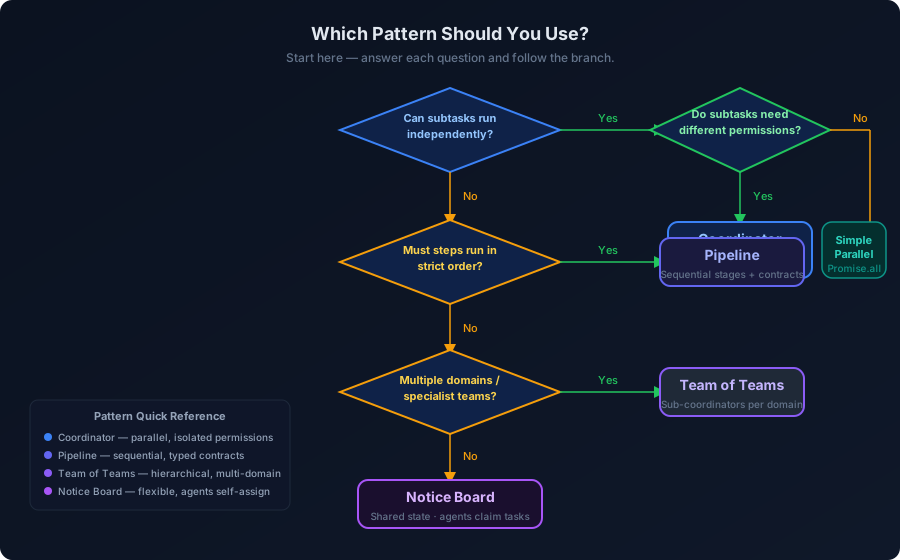 Which Pattern Should You Use?
| Situation | Pattern | Why |
|---|---|---|
| Task decomposes into parallel subtasks | Coordinator | Parallel execution, isolated permissions |
| Each step builds on the previous step's output | Pipeline | Typed contracts, clean early-exit |
| Multiple domains, each large enough to warrant a team | Team of Teams | Hierarchical synthesis, domain isolation |
| Full task list unknown upfront; evolves dynamically | Notice Board | Self-organising, maximum flexibility |
| Simple task, one model is clearly sufficient | Single Agent | Patterns add overhead — don't use them |
The last row deserves emphasis. Multi-agent systems add latency (network hops between agents), complexity (more failure points), and cost (more LLM calls). If a single agent genuinely handles your task reliably, use it. The patterns in this post are not best practices for their own sake — they're tools for specific problems.
The Hidden Cost Nobody Talks About
Every agent boundary is a serialization/deserialization point. An agent produces output, you parse it, format it as a new prompt, send it to the next agent. If the output format is wrong — even slightly — the whole chain breaks.
This means your contracts and output schemas matter enormously. Every agent-to-agent handoff should:
- Use structured output (JSON schema validation, not free-form text) wherever your model supports it
- Include an explicit format check before passing to the next stage — fail loudly, not silently
- Log the full contract at every stage boundary so you can debug which stage produced the bad output
The teams I've seen struggle most with multi-agent systems aren't struggling because the AI is bad. They're struggling because they're passing unstructured strings between agents and then wondering why the fourth agent in the chain is behaving erratically. The problem was introduced in stage two.
Questions I Get Asked
How many agents is too many?
There's no universal number. The signal is coordination overhead. If your coordinator is making decisions about twenty-plus subtasks simultaneously, it's probably too much. Consider a hierarchical structure with sub-coordinators.
Can agents call other agents recursively?
Yes, and this is sometimes exactly what you want. A research agent that discovers a topic it doesn't have enough depth on might spawn a deeper-research sub-agent. Just build in depth limits and loop detection — an agent that calls itself recursively without a base case will drain your budget and your patience.
Should agents share memory?
With care. The Notice Board pattern explicitly uses shared state, and it works well when the state is structured and access is controlled. Ad hoc "let agents read each other's context" usually leads to hidden couplings that are hard to debug. If agents need to share information, make it explicit: define what goes on the board, when, and by whom.
What if one agent fails mid-pipeline?
Build for failure. Every agent call should have a timeout. Every stage boundary should be a checkpoint you can resume from. In production pipelines, I use a simple state machine: pending → claimed → completed | failed. A failed task can be retried, and because the state is persisted, a crash in the middle doesn't lose everything that came before.
How do I test multi-agent systems?
Test each agent in isolation first — give it a fixed input and assert on the output. Then test the contracts: does the output of stage N match the expected input schema for stage N+1? Integration tests across the full system are valuable but expensive. Get coverage at the unit and contract level first.
The Real Question
The teams that build great AI systems aren't the ones who pick the right model. They're the ones who design the system so each component has a limited, well-defined job.
A context window is finite. Serialised execution is slow. Broad permissions are dangerous. These facts don't change regardless of what's written on the model's release notes. The patterns in this post are the architectural response to those facts.
The single agent that ran fine in your demo will eventually hit one of these walls. The question isn't whether to split the work — it's whether you design the split before it breaks, or after.
Building something that's hitting these limits? I work directly with teams to audit AI systems and redesign them for production. Book a technical diagnostic and we can look at your specific situation.
Vibe Coding Survival Guide
How to Ship AI-Assisted Code That Doesn't Embarrass You in Production
A production-minded guide for developers, founders, and teams using AI coding tools without letting brittle generated code reach customers.
If you found this article helpful, consider buying me a coffee to support more content like this.
Related Articles
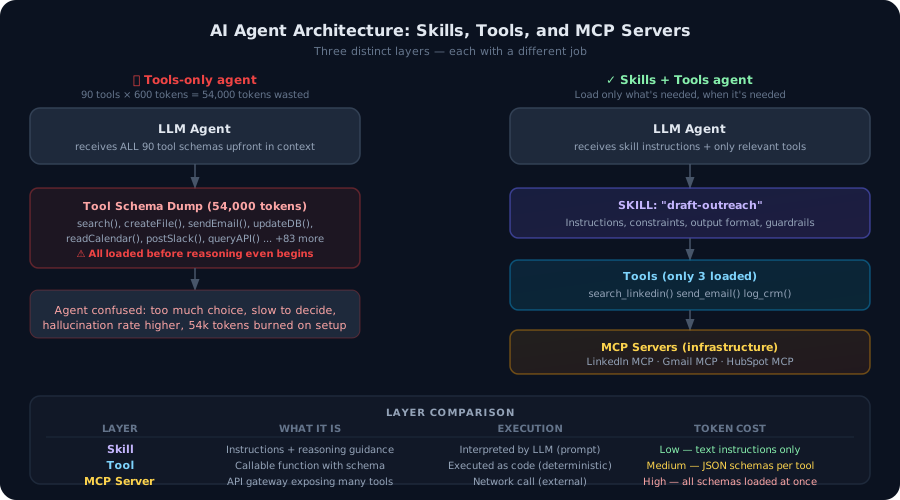
Most developers build agents with tools. That's not enough. Here's the architectural difference between agent tools and agent skills — and why getting this wrong burns tokens, degrades accuracy, and makes your agents brittle in production.

The economics that made your demo cheap fall apart at scale. Context window bloat, wrong model for the task, and zero caching are costing you 60–90% more than necessary. Here are five levers — with Node.js code — to cut your LLM bill without touching your output quality.
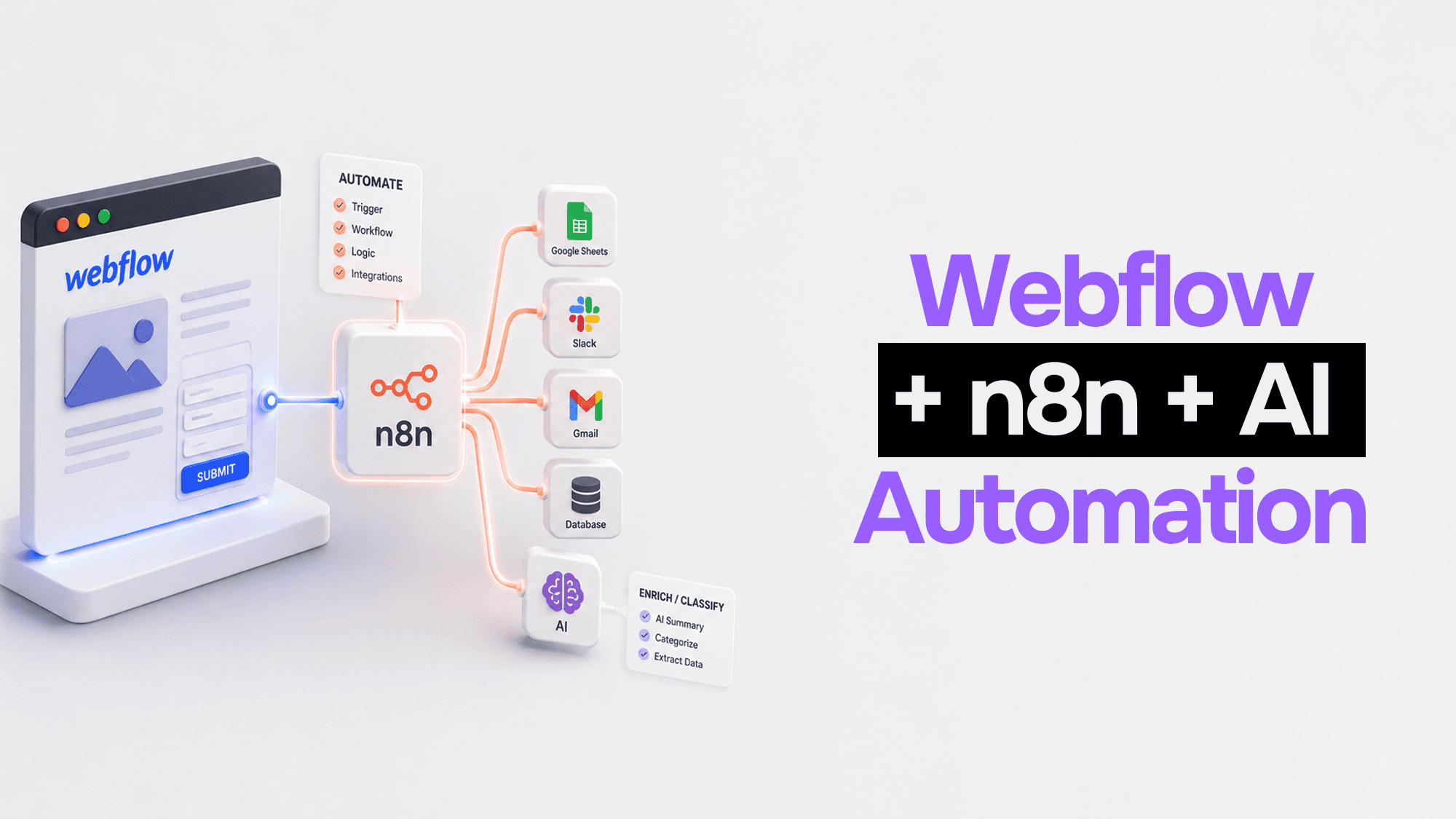
Webflow handles your frontend beautifully. n8n handles the logic. Claude handles the intelligence. Here's how to wire them together into automation pipelines that actually work.
Vibe Coding Survival Guide
How to Ship AI-Assisted Code That Doesn't Embarrass You in Production
A production-minded guide for developers, founders, and teams using AI coding tools without letting brittle generated code reach customers.