

AI Agent Skills vs Tools: The Distinction Every Developer Gets Wrong
When most developers first build an AI agent, they think in terms of tools: give the LLM a list of functions it can call, let it pick the right one. Search, create file, send email, query the database. The agent has tools. Surely that's all it needs.
Then production happens. The agent calls the wrong tool. It hallucinates function arguments. It picks a five-step approach when a one-step approach was obvious. It times out because it's iterating through a 90-tool list before it can do anything. And the token bill is baffling.
The missing piece isn't more tools. It's skills — and understanding the difference between the two is the architectural insight that separates fragile demo agents from reliable production systems.
The Three Layers Most Developers Collapse Into One
Mature agent architectures distinguish between three separate layers:
- Skills — the reasoning and guidance layer (prompt-based, interpreted by the LLM)
- Tools — the execution layer (code that runs deterministically)
- MCP Servers — the infrastructure layer (APIs that expose collections of tools)
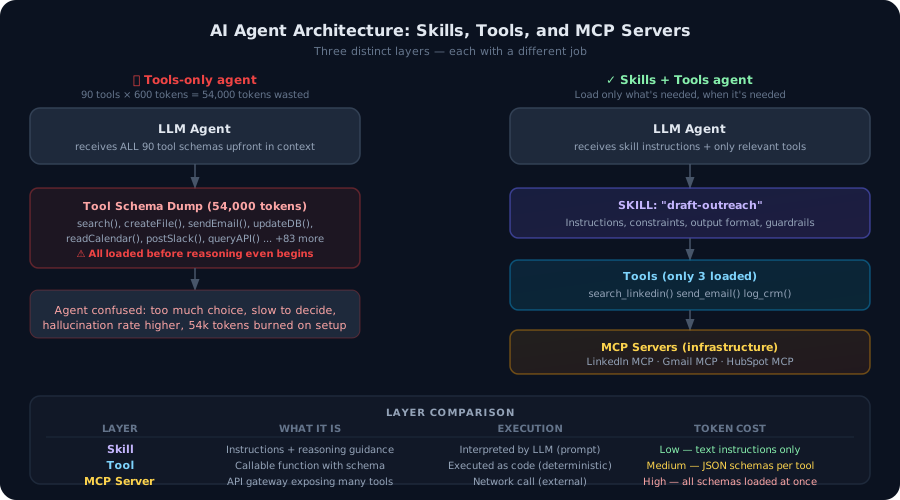
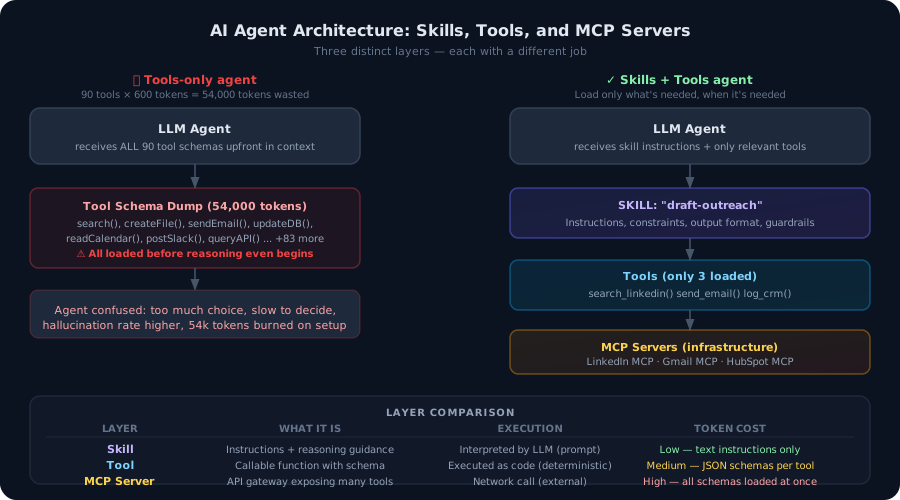 Architecture diagram showing skills, tools, and MCP servers as distinct layers, with a comparison of tool-heavy vs skills-plus-tools agents
Most tutorials collapse all three into "tools." That works for demos. It breaks in production, for reasons that are predictable once you understand the distinction.
What a Tool Actually Is
A tool is a callable function with a defined schema. When you give an LLM a tool, you're providing:
- A name
- A description (what it does)
- Input parameters with types and descriptions
- The expectation that calling it will produce a deterministic result
// A tool: deterministic, callable, schema-driven
const searchTool = {
  name: "search_linkedin",
  description: "Search LinkedIn for a person by name and company",
  input_schema: {
    type: "object",
    properties: {
      name: { type: "string", description: "Full name of the person" },
      company: { type: "string", description: "Company they work at" },
    },
    required: ["name"],
  },
};
When the LLM calls this, your code executes. The result is real and deterministic. The LLM decided to call it, but it didn't run it.
Tools are excellent. They're how agents interact with the real world — fetching data, making API calls, writing files, querying databases. Without tools, an agent is just a text generator.
The problem is what happens when you have too many of them.
The Token Problem With Tool-Heavy Agents
Every tool you give an agent gets loaded into the context window as a JSON schema. A moderately complex tool schema runs 300–600 tokens. An MCP server with 90 exposed tools? That's potentially 54,000 tokens consumed before the agent has processed a single word of user input.
Anthropic's own engineering team encountered this problem building Claude's MCP integrations. One GitHub MCP server exposes 90+ tools. The schemas alone exceeded 50,000 tokens. The agent became slower, less accurate, and dramatically more expensive — not because of what the agent was doing, but because of what it was being forced to read.
This is the tool-loading problem: the cost of capability description scales with the number of tools, not with what the agent actually needs to do.
What a Skill Actually Is
A skill is different in a fundamental way. A skill is instructions, constraints, and reasoning guidance — not executable code. It lives in the prompt layer. The LLM reads it, interprets it, and adjusts its behavior accordingly.
A skill might tell the agent:
- What task it's doing (context and framing)
- Which tools are relevant (progressive disclosure — only load what's needed)
- How to think about it (step-by-step reasoning guidance)
- What constraints apply (guardrails, output format requirements)
- What good output looks like (success criteria)
- What to do when things go wrong (error handling guidance)
# SKILL: draft-sales-outreach

## Context
You are drafting personalized cold outreach emails for a B2B sales workflow.
The goal is a short (< 150 words), specific email that references the prospect's
actual situation rather than a generic template.

## Tools available in this skill
- search_linkedin: Find the prospect's recent activity and role
- get_company_news: Pull recent news about the prospect's company
- send_email: Send the drafted email (requires explicit user approval)

## Process
1. Search for the prospect on LinkedIn to understand their current role and focus
2. Check for recent company news to find a relevant hook
3. Draft an email opening with the specific hook (not "I noticed your company...")
4. Keep the ask minimal — a 15-minute call, not a full pitch
5. Present the draft for review before calling send_email

## Guardrails
- Never send without explicit user confirmation
- Do not fabricate specific details; if research returns nothing, say so
- Maximum 3 sentences before the ask
This skill loads three tools (not ninety), provides reasoning structure, enforces a review step before sending, and gives the LLM enough context to do the task well without hallucinating.
Key difference: the skill is text — it costs tokens proportional to its length (typically 200–500 tokens for a well-written skill). The three tools it loads add another ~1,200 tokens of schemas. Total context overhead: ~1,700 tokens instead of 54,000.
Skills Are Not Executable — That's the Point
A common confusion: developers hear "skill" and think it's compiled code that runs separately from the LLM. It's not. A skill is consumed by the LLM as part of its context, much like a system prompt — but with clearer structure and intent than a monolithic system prompt.
The skill doesn't run. The LLM reads it, uses it to guide its reasoning, and then decides which tools to call and how.
This is actually an architectural advantage: you can update a skill by editing a markdown file. No deployment, no schema migration, no breaking changes downstream. You can version skills like documentation. You can have different skills for different roles or contexts, loaded on demand.
Tools vs Skills vs MCP Servers: The Full Hierarchy
| Layer | What it is | How it executes | Token cost |
|---|---|---|---|
| Skill | Instructions + reasoning guidance | Interpreted by LLM | Low (text only) |
| Tool | Callable function with schema | Runs as code (deterministic) | Medium (JSON schema per tool) |
| MCP Server | API gateway exposing many tools | Network call (external) | High (all schemas loaded at once) |
The practical implication: connect MCP Servers at the infrastructure layer, expose their tools selectively through skills, and let skills load only the tools relevant to the current task.
This is the progressive disclosure pattern:
User request
  → Skill selector (which skill applies to this request?)
      → Skill loads (instructions + 2-4 relevant tools)
          → Agent executes with focused context
              → Tools call MCP servers as needed
Instead of giving the agent 90 tools and hoping it picks the right ones, you're giving it 3 tools and telling it exactly how to use them.
Building a Skill in Practice
Here's a concrete example: a research skill for an agent that helps with account research.
Without a skill (tool-heavy approach):
// Pass all tools and hope the agent figures it out
const agent = new Agent({
  tools: [
    webSearchTool,
    linkedInSearchTool,
    crunchbaseTool,
    twitterSearchTool,
    newsSearchTool,
    emailFinderTool,
    crmLookupTool,
    calendarCheckTool,
    noteTakerTool,
    slackMessageTool,
    // ... 12 more tools
  ],
  system: "You are a helpful sales research assistant."
});
The agent will call tools in unpredictable order, often over-researching, sometimes missing the obvious first step, and occasionally hallucinating CRM data it didn't actually look up.
With a skill:
// Load the skill, which specifies exactly which tools and how to use them
const skill = await loadSkill("account-research");

const agent = new Agent({
  tools: skill.tools,          // Only the 3 tools this skill needs
  system: skill.instructions,  // Clear reasoning guidance
  outputFormat: skill.schema,  // Structured output definition
});
The skill file (account-research.md) specifies:
# SKILL: account-research

## Tools
- web_search: General search for recent news
- linkedin_search: Find decision-makers and org structure
- crm_lookup: Check if we already have a relationship

## Process
1. Start with CRM — if we have a relationship, prioritize that context
2. Search LinkedIn for the company's decision-makers in [buyer persona]
3. Run a news search for the last 30 days: company name + "funding" OR "expansion" OR "partnership"
4. Synthesize into a brief (< 300 words): key people, recent trigger, recommended hook

## Output format
Return a structured JSON with: contacts[], recentTrigger, recommendedHook, existingRelationship
The difference in output quality is significant — not because the LLM got smarter, but because it's working with a focused, structured context instead of a tool catalogue.
When to Use Each Layer
Use a skill when:
- The task has a multi-step reasoning process that should always follow a pattern
- You need guardrails (approval steps, output constraints, error handling)
- You want to load only a subset of tools contextually
- The task involves domain-specific knowledge or terminology
- Multiple agents or prompts need to do this same task consistently
Use a bare tool when:
- The action is simple, deterministic, and needs no reasoning guidance
- You're building a skill and need to define what it can call
- The LLM already has sufficient context from the conversation
Use an MCP server when:
- You need access to a large collection of capabilities from an external service
- You want to expose those capabilities to multiple different skills selectively
- Standardised integration matters (MCP tools are reusable across agents and frameworks)
The Composability Advantage
The real power of the skill layer emerges when you have multiple skills working together. A well-designed skill library means you can compose complex workflows from reusable pieces:
"Research this company and draft an outreach email"
  → Trigger: account-research skill
  → Trigger: draft-outreach skill (with research output as input)
  → Human approval step
  → Trigger: send-communication skill
Each skill is independently tested, independently maintainable, and reusable across different agents and workflows. The same draft-outreach skill works whether the research came from a human, another agent, or an automated trigger.
This is where agent architectures start to look more like software engineering and less like prompt hacking. Skills are your functions. Tools are your system calls. MCP servers are your external libraries.
What This Looks Like in Node.js
Here's a minimal implementation of the skill-loading pattern:
import Anthropic from "@anthropic-ai/sdk";
import fs from "fs/promises";
import path from "path";

interface Skill {
  instructions: string;
  tools: Anthropic.Tool[];
}

// Load a skill from a markdown file + associated tool definitions
async function loadSkill(skillName: string): Promise<Skill> {
  const skillDir = path.join(process.cwd(), "skills", skillName);

  // Read the skill instructions (markdown)
  const instructions = await fs.readFile(
    path.join(skillDir, "SKILL.md"),
    "utf-8"
  );

  // Load only the tools this skill declares
  const toolManifest = JSON.parse(
    await fs.readFile(path.join(skillDir, "tools.json"), "utf-8")
  );
  const tools = await Promise.all(
    toolManifest.map((name: string) => import(`./tools/${name}`).then((m) => m.schema))
  );

  return { instructions, tools };
}

// Run an agent task with a specific skill
async function runWithSkill(skillName: string, userMessage: string) {
  const client = new Anthropic();
  const skill = await loadSkill(skillName);

  const response = await client.messages.create({
    model: "claude-sonnet-4-6",
    max_tokens: 4096,
    system: skill.instructions,
    tools: skill.tools,       // Only this skill's tools — not all 90
    messages: [{ role: "user", content: userMessage }],
  });

  return response;
}

// Usage
const result = await runWithSkill(
  "account-research",
  "Research Stripe for a prospecting call next Tuesday"
);
The skill directory structure:
skills/
  account-research/
    SKILL.md           ← instructions, process, guardrails
    tools.json         ← ["web_search", "linkedin_search", "crm_lookup"]
  draft-outreach/
    SKILL.md
    tools.json         ← ["get_template", "personalize_copy", "send_email"]
  schedule-followup/
    SKILL.md
    tools.json         ← ["check_calendar", "create_event", "send_calendar_invite"]
Each skill is a directory. Each directory has instructions and a tool manifest. When a skill loads, only its declared tools get passed to the model.
The Production Reality
I've seen this pattern make the difference between agents that work reliably and agents that feel impressive in demos but fail unpredictably in production.
The failures almost always trace back to the same root cause: the agent had too much capability and too little guidance. Ninety tools and a three-sentence system prompt is not an architecture. It's a lottery.
Skills flip that ratio. You add reasoning guidance and intentionally constrain the tool set. The agent becomes less capable in the abstract sense — it can't suddenly decide to use the calendar tool when it's in a research skill — and dramatically more reliable in practice.
The constraint is the feature.
FAQ
Are skills the same as system prompts?
Related but distinct. A system prompt is a single global instruction for the agent. A skill is a scoped, composable unit of guidance that typically applies to a specific task category. You can swap skills based on the task while keeping a lightweight base system prompt. Skills are also typically smaller and more focused than full system prompts.
Do skills work with any LLM provider?
Yes. Skills are just text — markdown instructions that you include in the model's context. They work with Claude, GPT, Gemini, or any model that accepts a system prompt. The tool schemas within the skill need to match the provider's tool-use format, but the skill instructions themselves are model-agnostic.
What's the difference between a skill and an agent?
An agent is a runtime entity that uses skills, tools, and memory to accomplish tasks. A skill is a piece of that agent's configuration. The same agent can use different skills for different tasks. You can also think of skills as "mini-specs" that define how an agent should behave in a specific context.
How do I know when to split something into two skills vs. one?
If two tasks require different tools, different reasoning processes, or different output formats — split them. If one task naturally flows into another and shares all the same tools, keep them together. A useful test: could you hand each skill to a different person and have them execute it independently? If yes, it's probably two skills.
Vibe Coding Survival Guide
How to Ship AI-Assisted Code That Doesn't Embarrass You in Production
A production-minded guide for developers, founders, and teams using AI coding tools without letting brittle generated code reach customers.
If you found this article helpful, consider buying me a coffee to support more content like this.
Related Articles
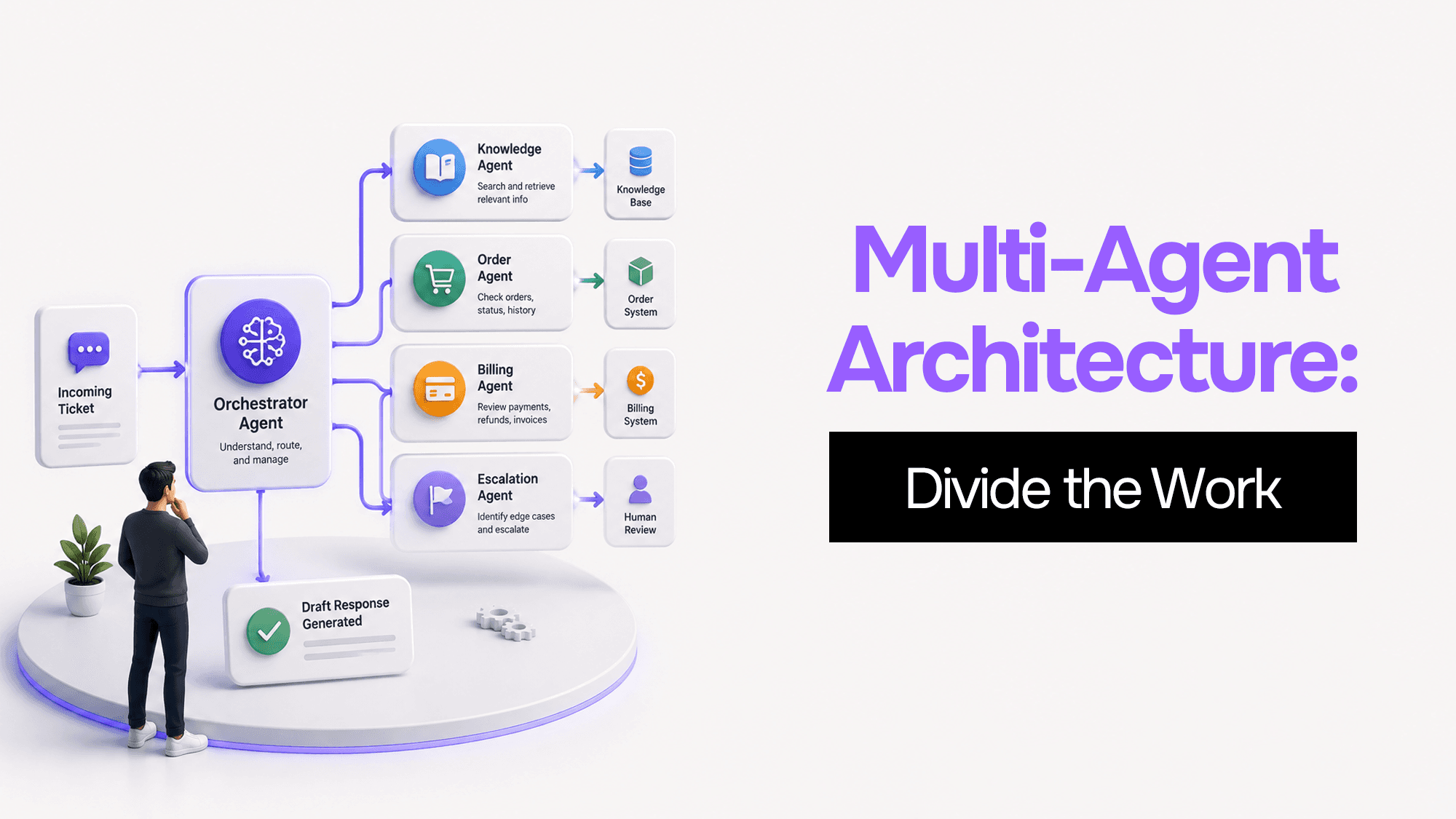
You built one AI agent and it worked. Then it got slower, started forgetting things, and ended up with access to databases it shouldn't touch. Here's what's actually happening — and four coordination patterns to fix it.
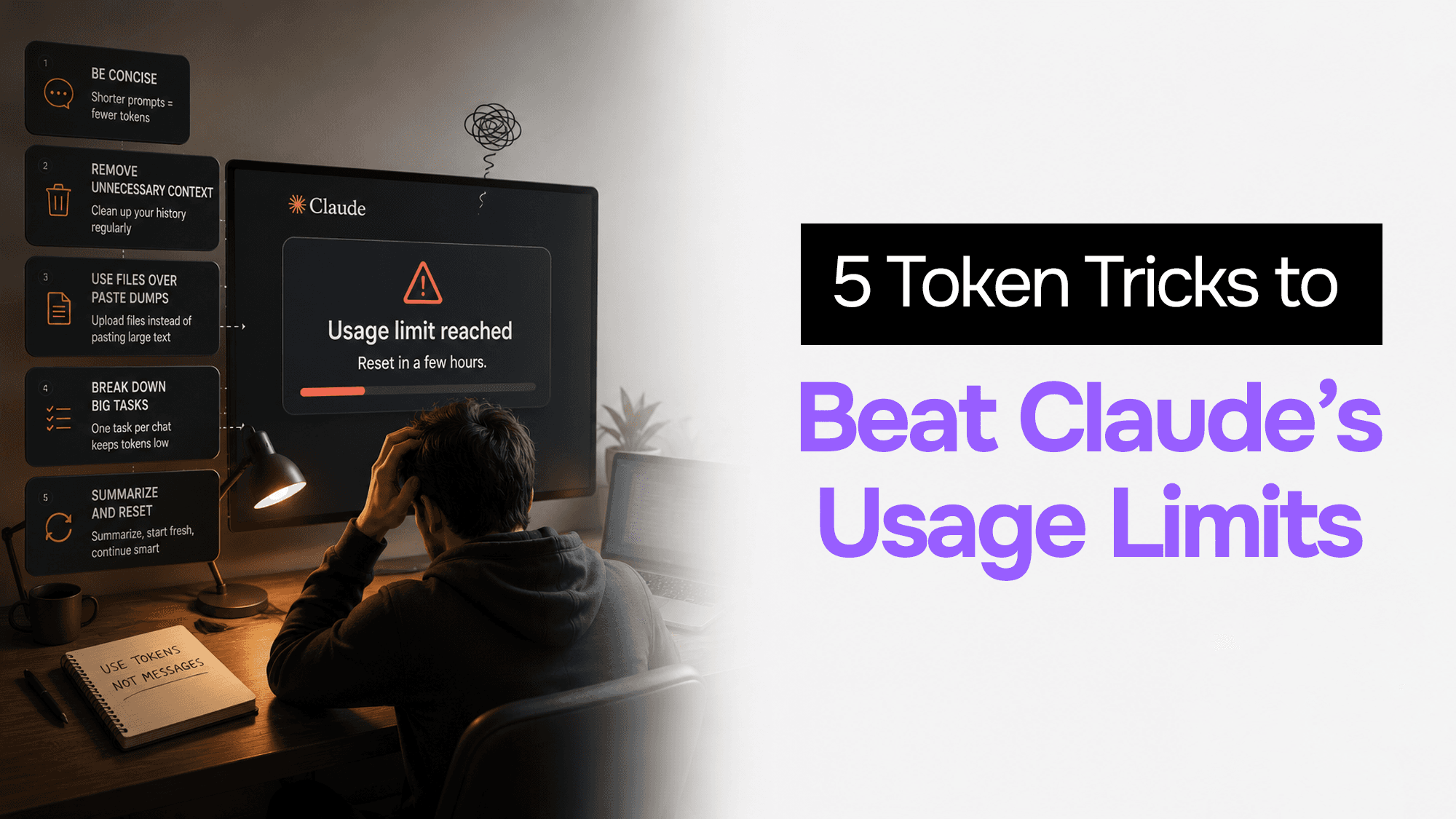
Claude doesn't count messages like ChatGPT — it counts tokens, and one conversation can burn 10x more than another. Here are 5 tricks that cut your token usage by 80% or more.

The economics that made your demo cheap fall apart at scale. Context window bloat, wrong model for the task, and zero caching are costing you 60–90% more than necessary. Here are five levers — with Node.js code — to cut your LLM bill without touching your output quality.
Vibe Coding Survival Guide
How to Ship AI-Assisted Code That Doesn't Embarrass You in Production
A production-minded guide for developers, founders, and teams using AI coding tools without letting brittle generated code reach customers.