

AI Document Processing: How Businesses Can Automate Documents With Artificial Intelligence
Every business that runs on paperwork has the same quiet problem. Thousands of PDFs, invoices, contracts, forms, and reports arrive every month, and somebody has to read each one, copy the right numbers into the right system, check them, and pass the result along.
That work is slow, repetitive, and error-prone. Fields get mistyped. Approvals stall in someone's inbox. The one clause that mattered sits on page 14 of a contract nobody had time to finish. And all that unstructured information is nearly impossible to search later.
AI document processing fixes this by letting software read, understand, validate, and route documents automatically, with people stepping in only where judgment is actually needed. This guide covers how it works, how to prepare documents for accurate results, where it fits, how to evaluate a solution, and what implementation looks like in practice.
What Is AI Document Processing?
AI document processing is the use of artificial intelligence to turn documents into structured, usable data and to act on it. Instead of a person reading a document and typing its contents into a system, the software does the reading and the first pass at understanding.
In practice, an AI document processing system can:
- Read documents in many formats
- Extract specific information
- Classify documents by type
- Understand context, not just characters
- Identify entities such as people, companies, dates, and amounts
- Summarize long content
- Validate what it extracted
- Send clean data to business systems
- Trigger the next step in a workflow
AI Document Processing vs. Traditional Document Processing
| Traditional processing | AI document processing |
|---|---|
| Manual data entry | Automated extraction |
| Rule-based workflows | AI-driven understanding |
| Fixed document formats | Handles varied layouts |
| Basic OCR | OCR plus contextual understanding |
| Manual validation | Automated validation plus human review |
| Limited scalability | Scales with volume |
The practical difference is resilience. A template-based system breaks when a vendor changes their invoice layout. An AI-based one reads the document the way a person would, by looking for what a field means rather than where it used to sit.
How Does AI Improve Document Processing?
Faster data extraction. Employees no longer key in every field. The system pulls vendor names, dates, amounts, and terms directly from the document.
Better document understanding. Plain OCR recognizes characters. AI recognizes relationships: that this number is the invoice total, that this date is the payment due date, and that this clause limits liability.
Automated classification. Mixed batches get sorted without human triage: invoices, contracts, purchase orders, tax documents, insurance claims, application forms.
Intelligent validation. The system flags missing, inconsistent, or suspicious values before they reach your accounting or CRM system.
Automated workflow routing. Once the data is clean, it can trigger the next step: create a bill, open a ticket, notify an approver, update a record. For a broader look at that last step, see AI agent workflow automation.
How Does AI Understand Documents?
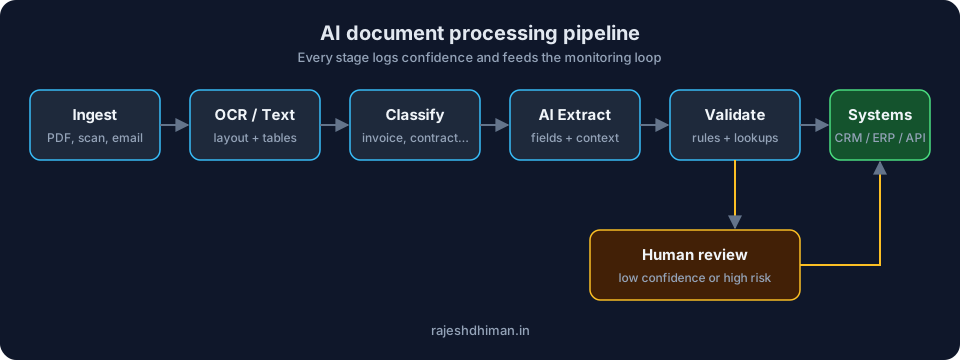 AI document processing architecture
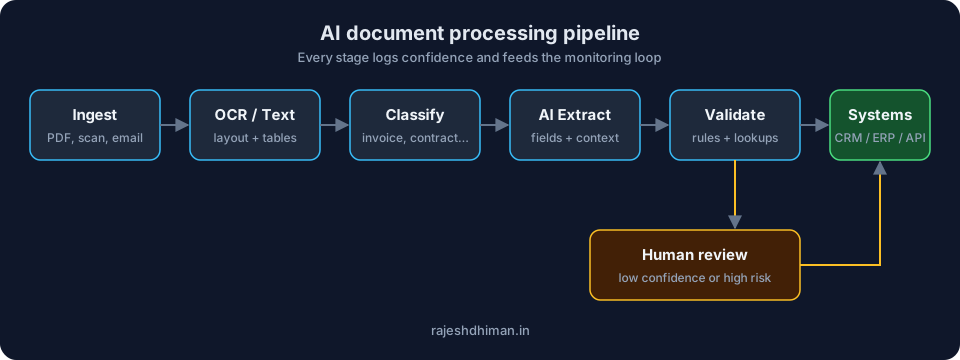
Most production systems follow the same six stages.
1. Document ingestion
Documents arrive from email inboxes, upload forms, shared drives, scanners, or APIs. Formats include PDFs, scans, images, Word files, emails, and forms.
2. OCR and text extraction
Scanned documents and images are converted into machine-readable text. Digital PDFs that already contain a text layer can skip OCR, but they still need layout analysis so tables and columns survive.
3. Document classification
The system identifies what it is looking at. An invoice and a contract need different extraction logic, so classification decides which path the document takes.
4. Information extraction
The AI identifies the fields that matter: names, dates, addresses, invoice numbers, amounts, contract terms, product details, and account numbers.
5. Contextual understanding
This is where modern LLMs earn their place. The model works out what each extracted value means within the document, such as telling a billing address from a shipping address, or a termination date from an effective date.
6. Validation
Extracted data is checked against business rules, databases, APIs, existing records, and, when needed, human reviewers.
How to Process Documents for Accurate AI Understanding
Accuracy is mostly decided before the model ever sees the document. These are the practices that move the numbers.
Start with good source documents. Low-resolution scans and skewed photos reduce extraction accuracy. If you control how documents are captured, fix quality at the source.
Clean and preprocess. Image preprocessing, noise removal, page segmentation, rotation correction, and text normalization all help. They are unglamorous and they matter.
Use OCR only where necessary. If a PDF already contains selectable text, run text extraction instead. OCR adds its own errors.
Preserve document structure. Headings, tables, lists, sections, and the relationships between fields carry meaning. If your pipeline flattens a table into a stream of words, the model has to guess which number belongs to which column.
Use context-aware extraction. Extract fields together with the text around them, not as isolated strings.
Add validation rules. Simple arithmetic catches a surprising number of errors. For invoices, the total should equal line items plus tax minus discounts. If it does not, something was misread.
Keep a human in the loop. Route high-risk or low-confidence documents to a reviewer. The goal is not zero human involvement; it is human attention spent where it counts.
AI Document Processing vs. Intelligent Document Processing
Intelligent document processing (IDP) is the mature form of the idea. It combines OCR, AI, machine learning, NLP, computer vision, and workflow automation into a single pipeline.
The terms are often used interchangeably, but there is a useful distinction:
- OCR reads characters.
- AI document processing extracts and interprets information.
- Intelligent document processing extracts, understands, validates, and triggers workflows.
If a vendor says "IDP", ask which of those layers they actually provide.
How AI Reduces Human Errors in Document Processing
Human error in document work is rarely carelessness. It is the predictable result of repetitive tasks done at volume. AI helps in six specific ways:
- Less manual data entry. Fewer keystrokes, fewer typos.
- Standardized extraction. The same logic runs on every document, at 9 a.m. and at 5 p.m.
- Automated validation. Totals, formats, and required fields are checked every time.
- Duplicate detection. The same invoice submitted twice gets flagged.
- Missing-information detection. Blank required fields are caught before they cause downstream problems.
- Confidence scores. Each extracted value carries a confidence level, so uncertain ones go to a person.
One honest caveat: AI does not eliminate errors. It changes their shape. A model can produce a confident but wrong value, which is why production systems need validation, monitoring, and human oversight for anything sensitive.
Common Business Use Cases for AI Document Processing
Invoice processing
Extract vendor, invoice number, date, amount, tax, and payment terms. Match against purchase orders and push approved invoices to your accounting system.
Contract processing
Identify clauses, extract dates and obligations, compare terms across contracts, and flag unusual language for legal review.
Insurance claims
Extract claimant information, analyze supporting documents, identify claim details, and route claims to the right handler.
Financial documents
Process bank statements, expense reports, tax documents, and financial forms.
HR documents
Handle resumes, employee forms, applications, and certificates.
Compliance documents
Process regulatory forms, audit documentation, policies, and risk records, with an audit trail for each decision.
AI Document Processing for PDFs
PDFs are the most common format and the most deceptive. A "PDF" might be a clean digital file, a scan of a fax, a 90-page contract, or a form with fillable fields. Each needs different handling.
The typical flow is:
PDF → OCR/text extraction → layout analysis → AI understanding → structured data → business workflow
Common challenges include scanned pages, tables, multi-column layouts, handwriting, poor formatting, embedded images, and documents that mix several structures. Layout analysis and table handling are where a lot of the real engineering effort goes.
What Is the Best AI Document Processing Approach?
Rather than hunting for a universal "best" tool, evaluate any solution against the criteria that decide success in your environment:
- Accuracy on your actual documents, not on a vendor demo set
- Supported document types now and in the next year
- OCR capabilities, including handwriting and low-quality scans
- Data extraction quality for tables and complex layouts
- API integrations with your CRM, ERP, and accounting systems
- Workflow automation for routing, approvals, and exceptions
- Security and compliance controls
- Human review tooling for low-confidence cases
- Scalability at your peak volume
- Monitoring and analytics so you can see accuracy over time
- Total cost of ownership, including setup, usage, and maintenance
Test with a few hundred of your own documents, including the ugly ones. That tells you more than any feature comparison.
How Organizations Implement AI to Streamline Document-Heavy Processes
Step 1: Identify document-heavy processes
Look for workflows with high document volume, repetitive manual work, frequent errors, or long processing times.
Step 2: Identify document types
Catalogue format, volume, complexity, data fields, and processing frequency.
Step 3: Define extraction requirements
Decide exactly which fields matter and what "correct" means for each.
Step 4: Select the architecture
Typical components are OCR, computer vision, NLP, LLMs, machine learning models, a rules engine, and a validation layer.
Step 5: Integrate with existing systems
CRM, ERP, accounting platforms, HR systems, databases, cloud storage, and APIs. This is usually where most of the schedule goes.
Step 6: Add human review
Route uncertain or high-risk cases to employees with a review interface that shows the source document next to the extracted values.
Step 7: Monitor and improve
Track accuracy, processing time, error rates, manual intervention, and cost per document. Feed corrections back into the system.
AI Document Processing Architecture
A simple reference architecture looks like this:
Document sources → Ingestion → OCR / text extraction → Classification → AI / LLM processing → Data extraction → Validation → Structured data → API / workflow automation → CRM / ERP / business system
Where LLMs fit
LLMs are strongest at contextual understanding, summarization, question answering, classification, and extracting information from unusual or free-form layouts. They handle variety well.
When traditional ML or rules are better
Deterministic logic still wins for strict validation, numeric calculations, compliance rules, structured documents, and high-volume predictable processes. A good system uses both: LLMs for understanding, rules for anything that must be exactly right.
AI Document Processing Security and Data Privacy
Documents often contain the most sensitive data a company holds. Cover these before processing anything real:
- Encryption in transit and at rest
- Access controls and role-based permissions
- Data retention and deletion policies
- Handling of sensitive information and PII
- Audit logs for every extraction and decision
- Secure APIs
- Data residency requirements
- Model and provider policies on storing or training on your data
For enterprise workloads this section often decides whether the project goes ahead at all.
How Much Does AI Document Processing Cost?
Cost depends on scope, so a single fixed number would be misleading. The main drivers are:
- Document volume. Per-document costs fall at scale, but infrastructure grows.
- Document complexity. Clean forms are cheap; handwritten, multi-page, table-heavy documents are not.
- OCR requirements. Scan quality and language coverage affect tooling and tuning effort.
- AI model usage. LLM calls add per-document cost, which depends on model choice and document length.
- API integrations. Each connected system adds engineering time.
- Custom workflow requirements. Approvals, routing, and exception handling take design work.
- Security and compliance requirements. Audit trails, residency, and certifications add effort.
- Human review requirements. A review interface and process is part of the product, not an afterthought.
A good way to scope it is to measure your current cost per document, then model what the automated rate and exception rate would need to be to pay back the build.
How to Measure AI Document Processing Performance
| KPI | What it measures |
|---|---|
| Extraction accuracy | Correctness of extracted fields |
| Processing time | Time required per document |
| Automation rate | Share of documents processed without manual work |
| Error rate | Incorrect or missing information |
| Human review rate | Share of documents needing intervention |
| Cost per document | Processing efficiency |
| Straight-through processing | Fully automated document workflows |
Measure these against your manual baseline before you launch, otherwise you cannot show the improvement.
How I Can Help With AI Document Processing
I build production document pipelines for businesses that have outgrown manual entry. Typical engagements cover:
- AI systems: intelligent document workflows and AI-powered automation
- AI data engineering: reliable pipelines that process and transform document data
- Custom product engineering: document processing applications, dashboards, and internal tools
- API reliability: connecting document processing to external APIs and business systems without brittle glue code
- LLM architecture: LLM-powered document understanding and extraction systems
- Workflow automation: routing extracted data into downstream processes automatically
If you have a document-heavy workflow and want to know whether it is a good candidate, let's talk.
Conclusion
AI document processing is more than running OCR over a stack of files. A production-ready solution combines document ingestion, OCR, AI understanding, extraction, validation, workflow automation, and monitoring, with humans reviewing the cases that deserve it.
The safest way to start is small: pick one high-volume document workflow, prove the value with real accuracy and cost numbers, and then expand the same pipeline to other document types and processes.
Frequently Asked Questions
What is AI document processing?
AI document processing uses OCR, machine learning, and large language models to read documents, classify them, extract the fields that matter, validate the result, and send structured data to your business systems. It replaces manual data entry with an automated, reviewable pipeline.
How does AI improve document processing?
AI extracts data faster, understands context instead of just reading characters, classifies mixed document types automatically, validates results against business rules, and routes the output to the next step in a workflow. People spend their time on exceptions rather than on typing.
What is the difference between OCR and AI document processing?
OCR converts an image or scan into text. AI document processing goes further: it works out what the text means, extracts specific fields, checks them, and triggers downstream actions. OCR is one step inside an AI document processing pipeline.
How does AI reduce human errors in document processing?
It removes repetitive manual entry, applies the same extraction logic to every document, validates totals and required fields automatically, detects duplicates and missing information, and sends low-confidence results to a human reviewer. It does not eliminate errors entirely, so validation and monitoring stay in place.
Can AI process scanned PDFs?
Yes. Scanned PDFs are run through OCR and layout analysis first, then through AI extraction. Accuracy depends on scan quality, so preprocessing such as deskewing and noise removal matters. Digital PDFs that already contain text can skip the OCR step.
How does intelligent document processing work?
Intelligent document processing combines OCR, NLP, machine learning, and workflow automation. Documents are ingested, converted to text, classified, mined for fields, validated against rules and records, and then routed into systems like a CRM, ERP, or accounting platform.
What documents can AI process?
Invoices, purchase orders, contracts, insurance claims, bank statements, expense reports, tax forms, resumes, HR forms, compliance records, and most other business documents, whether structured, semi-structured, or free-form.
How do businesses automate document processing with AI?
Start with one high-volume document workflow, define the fields to extract, choose an architecture (OCR, LLMs, rules, validation), integrate it with your existing systems, add human review for uncertain cases, and monitor accuracy and cost per document. Expand once the first workflow proves its value.
Is AI document processing secure?
It can be, when it is built with encryption, role-based access, audit logs, data retention limits, PII protection, and a clear policy on what the model provider can store. Security and data residency requirements should be settled before any real documents are processed.
What is the best AI document processing solution for businesses?
There is no single best tool. The right approach depends on your document types, volume, accuracy needs, integrations, compliance requirements, and review process. Evaluate options on those criteria rather than on feature lists.
Stuck on a web app, automation, or AI project?
Fifteen minutes, free. You describe the blocker, I tell you what I would fix first. No deck, no pitch — and if I am not the right fit, I will say so.
Book Your Free 15-Min Strategy CallRelated to: AI Document Processing: How Businesses Can Automate Documents With Artificial IntelligenceIf you found this article helpful, consider buying me a coffee to support more content like this.
Related Articles

AI workflow automation uses AI agents to automate multi-step business processes that traditional automation can't handle. Learn how it works, where it adds value, and how to build it.
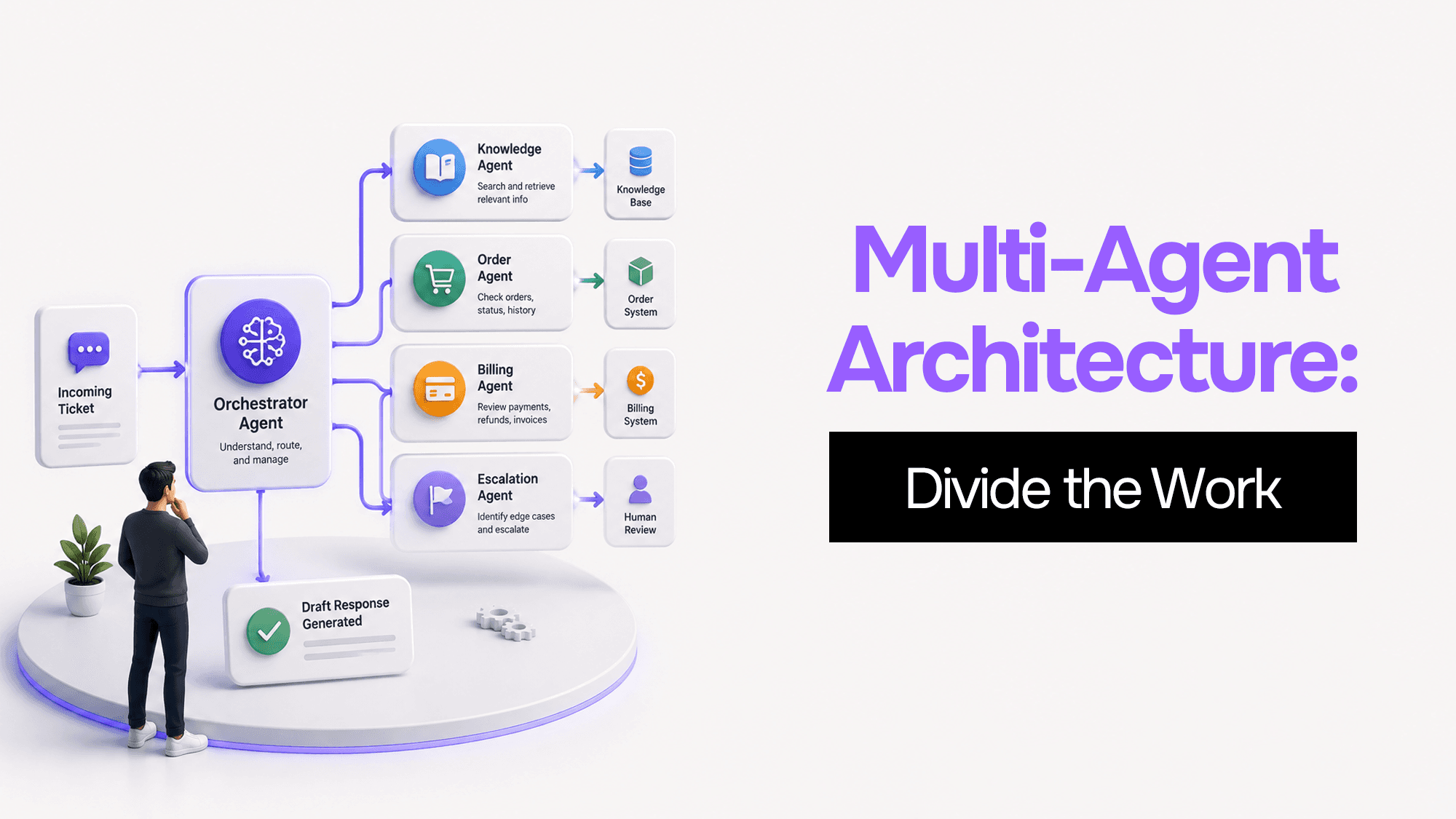
You built one AI agent and it worked. Then it got slower, started forgetting things, and ended up with access to databases it shouldn't touch. Here's what's actually happening — and four coordination patterns to fix it.

How to build an AI MVP that actually works — the 9-step process, real cost ranges, tech stack decisions, and the build vs. buy choices that determine whether your AI product ships in 8 weeks or 8 months.
Stuck on a web app, automation, or AI project?
Fifteen minutes, free. You describe the blocker, I tell you what I would fix first. No deck, no pitch — and if I am not the right fit, I will say so.
Book Your Free 15-Min Strategy CallRelated to: AI Document Processing: How Businesses Can Automate Documents With Artificial Intelligence