

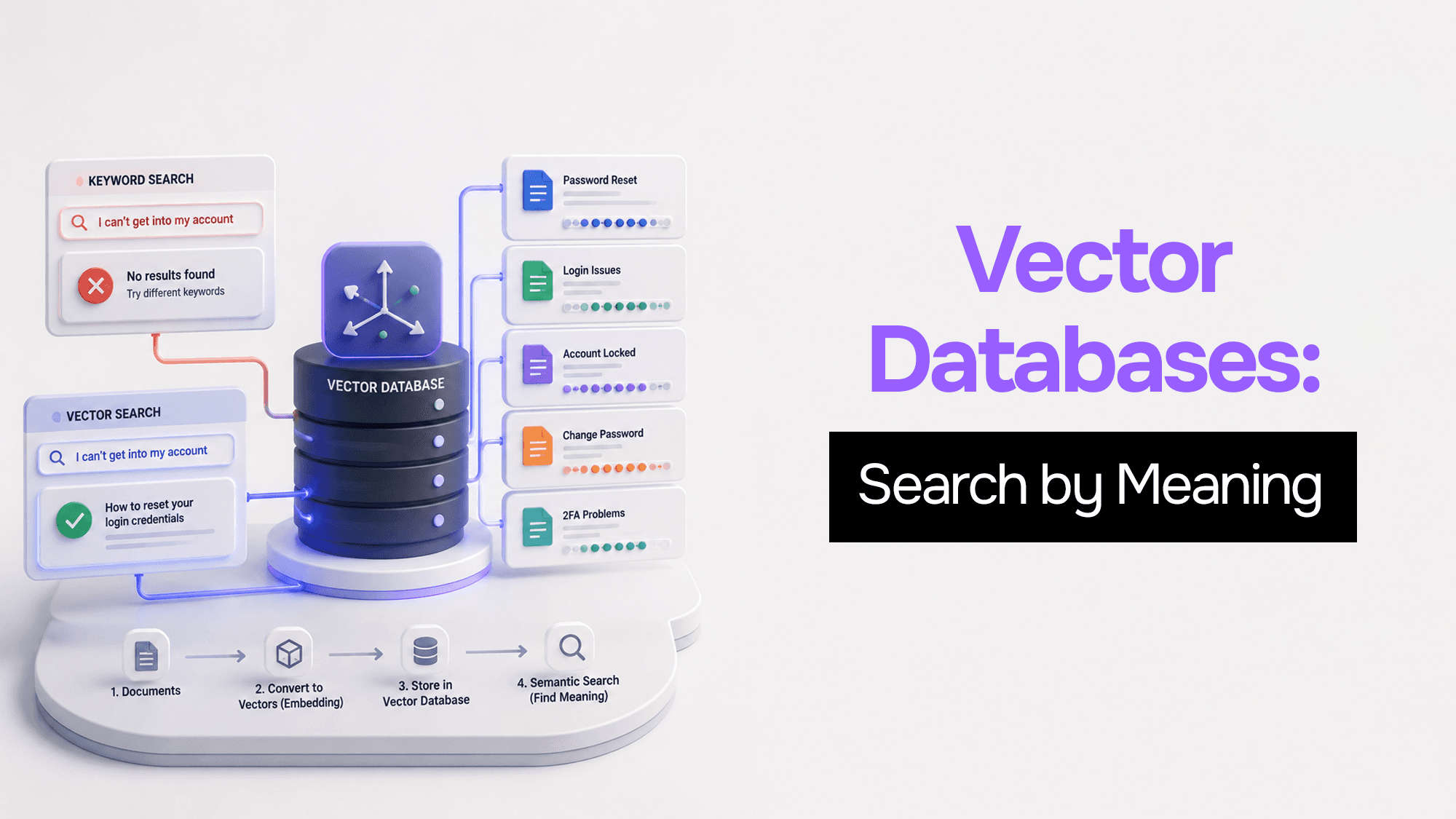
Vector Databases: What They Are and Why You Need One
You Build a Search. It Works. Then It Doesn't.
You're building a help docs page for your product.
You add search. It works great.
User types "password" → they get the password reset article. Perfect.
Then one day, a real user types:
"I can't get into my account"
Your search returns nothing.
But you have an article about that. It's called "How to reset your login credentials."
Same problem. Different words. System fails.
This happens every single time with keyword-based search. The database only sees words, not what the user actually means.
This is the problem that vector databases solve.
Why Your Regular Database Fails Here
Your PostgreSQL, MySQL, MongoDB — they are all built for one thing: find exact matches fast.
When you write:
SELECT * FROM articles WHERE title LIKE '%password%'; The database looks for the exact word "password". Nothing more.
It does not know that "can't get into my account" and "password reset" are the same idea.
For a traditional database, every word is just a string of characters. No meaning. No context.
This is fine for 90% of apps. But when you add AI features — chatbots, document search, recommendations — this breaks completely.
What is Semantic Search?
Semantic means meaning.
Semantic search does not match words. It matches intent.
So when a user types "I forgot how to sign in", semantic search understands they need the login help article — even if those exact words don't appear in your database.
How? This is where embeddings come in.
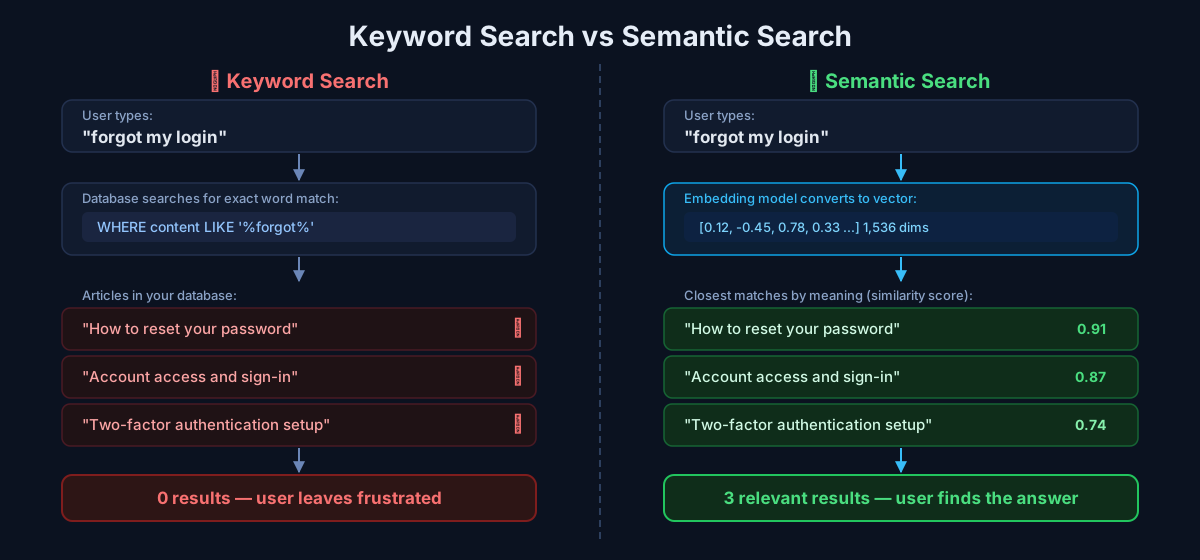 Keyword search fails to match meaning while semantic search finds the right results using vector similarity
What is an Embedding?
An embedding is just a list of numbers that represents meaning.
When you pass text to an AI model (like OpenAI's text-embedding-3-small), it converts your text into a long list of numbers. Something like:
[0.12, -0.45, 0.78, 0.33, -0.91, ...] This list is called a vector. It usually has 1,536 numbers (called dimensions).
Here is the magic part:
- "login" → vector A
- "sign in" → vector B
- "forgot password" → vector C
Vectors A, B, and C are very close to each other in mathematical space.
Because they all mean nearly the same thing.
And vectors for completely unrelated things — like "login" and "pizza recipes" — are far apart.
So instead of matching words, we measure distance between vectors.
Closer distance = more similar meaning.
The Problem Nobody Tells You About: Scale
OK so now you know how vectors work.
Here is what most people do next: they store all their vectors in a regular database and search them like this:
// Naïve vector search
for (let item of allDocuments) {
  const score = cosineSimilarity(queryVector, item.vector);
  results.push({ item, score });
}
results.sort((a, b) => b.score - a.score);
You compare your query vector against every single document in your database.
For 1,000 documents? Fast. No problem.
For 1,000,000 documents? You just made your users wait 16 minutes for a search result.
This is called O(n) search — the more data you have, the slower it gets. Linearly.
And there is no index that can help. Regular database indexes work on exact values. Vectors have no exact value to match.
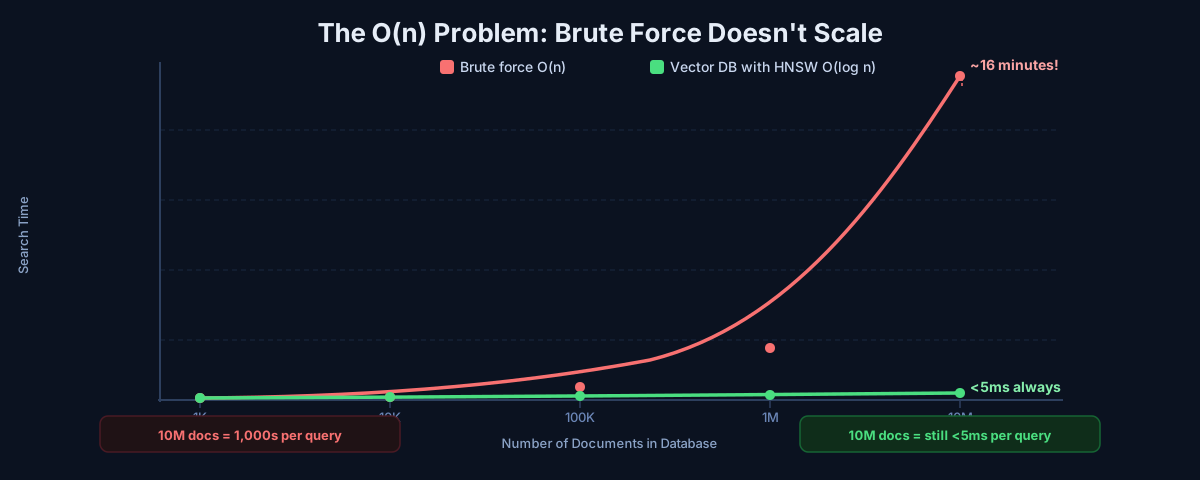 Brute force vector search grows linearly — fast at 10K documents, unusable at 10M
This is exactly why you need a vector database.
What a Vector Database Actually Does
A vector database is purpose-built for one job:
Find the most similar vectors — fast — at any scale.
It does this by building smart index structures during insert time. So when you search, you don't compare against everything. You navigate toward the answer.
Think about how Spotify recommends music.
It does not read every lyric of every song to find one that sounds like what you just played. It already knows which songs are "close" to each other — by genre, tempo, mood, style — because it built that map in advance.
When you hit "play", Spotify navigates toward similar songs using that pre-built map. It does not start from scratch.
That's what a vector database does for your data. It builds the map at insert time. So at search time, you navigate — you don't scan.
Inside a Vector Database: 3 Layers
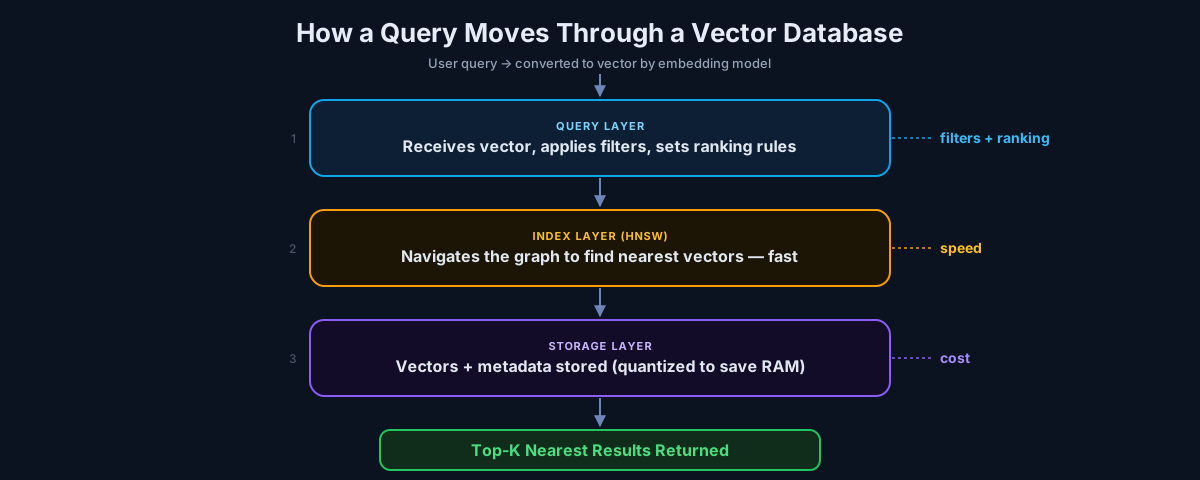 The 3-layer architecture of a vector database: query, index, and storage
Every vector database has three layers. Understanding this saves you hours of debugging.
1. Storage Layer — Where Vectors Live
Vectors take up a lot of space. Each number in a vector is stored as a 32-bit float. With 1,536 dimensions per vector, that's a lot of bytes per entry — and it adds up fast once you're in the millions.
To deal with this, vector databases support quantization. The idea is simple: instead of storing every number at full precision, you round it down to a smaller format. You trade a tiny bit of accuracy for a big drop in memory usage.
Most production systems run on Int8 quantization. The search results are nearly identical to full precision, but your RAM bill is a fraction of the cost. Binary quantization goes even further — smaller still, but you'll start to notice the quality difference in search results depending on your data.
The right choice depends on how much accuracy your use case actually needs. For a support chatbot, Int8 is more than enough. For medical or legal document retrieval, you might want to stay at full precision.
2. Index Layer — The Speed Secret (HNSW)
This is where the real magic happens.
The most popular algorithm in vector databases is called HNSW — Hierarchical Navigable Small World.
Forget the name. Here is the idea.
Imagine you're a librarian in a massive library with 10 million books. A reader comes in and says: "I want something like Harry Potter."
You don't read every book to find similar ones. Instead:
- You start at the genre section (fantasy/adventure)
- Then narrow down to sub-genre (young adult fantasy)
- Then look at similar authors and themes
- Finally, you pick the top 5 closest matches
You skipped 9.9 million books. You only checked a few hundred.
That's HNSW.
It builds layers of connections between similar vectors. When you search:
- Start at the top layer — few nodes, wide coverage
- Jump toward the target — follow connections to closer vectors
- Zoom in layer by layer — narrow down until you find the best matches
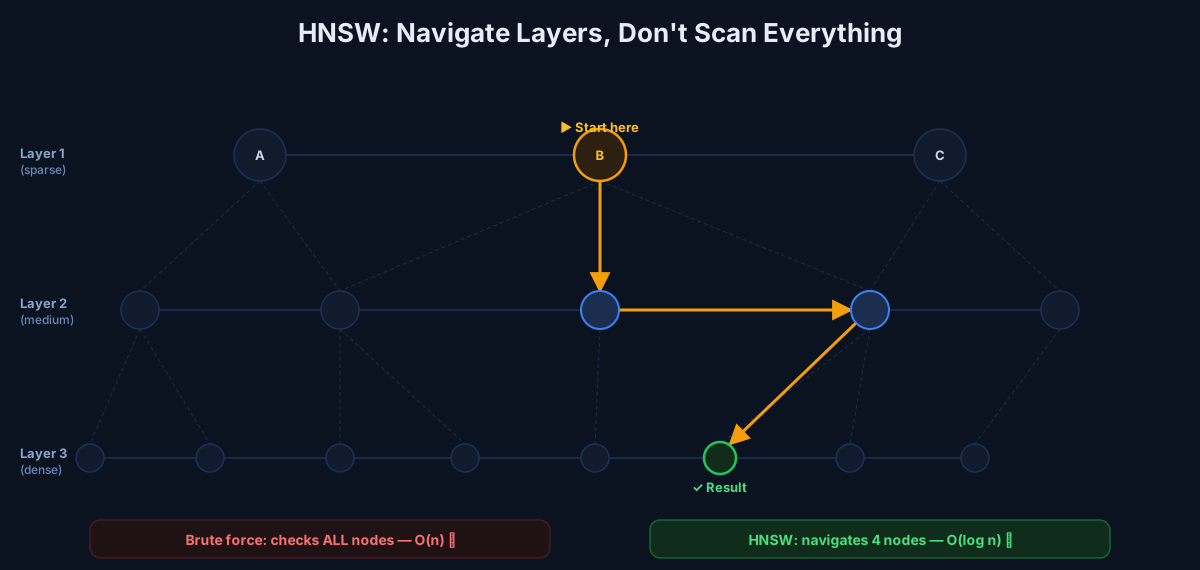 HNSW navigates through sparse layers down to the dense layer — checking only a handful of nodes instead of all of them
Result: instead of O(n), you get O(log n) search. Massively faster.
The tradeoff? HNSW gives you approximate nearest neighbors, not perfect ones.
But here's the honest truth: in 99% of real apps, "close enough" is genuinely good enough. Users don't know (or care) if the 3rd result was 0.001 more similar than the 4th.
3. Query Layer — Where Things Go Wrong
This is where most developers run into problems.
A query hits your vector database, gets converted into a vector, runs through the HNSW index, and returns the top matching results. Sounds clean. But there's a timing problem that catches people off guard.
Most apps need to combine vector search with regular filters — things like category = "billing" or user_id = 123 or language = "en". If you apply those filters after the vector search, you might filter out most of your results and end up with one or zero matches.
The right approach is pre-filtering — pass your metadata filters into the search query itself so the vector database applies them while it's navigating the index, not after.
// ❌ Wrong — filter after search
const results = await vectorDB.search(queryVector, { topK: 20 });
const filtered = results.filter(r => r.metadata.category === "billing");
// You might end up with 0 results

// ✅ Right — filter during search
const results = await vectorDB.search(queryVector, {
  topK: 10,
  filter: { category: "billing" }
});
Most vector databases (Pinecone, Qdrant, Weaviate) support this natively. Use it.
Building Semantic Search in Node.js
Here is what it looks like in practice. No external vector DB needed for this — just OpenAI embeddings and in-memory search to start.
Step 1: Install dependencies
npm install openai Step 2: Generate embeddings
import OpenAI from "openai";

const openai = new OpenAI({ apiKey: process.env.OPENAI_API_KEY });

async function embed(text) {
  const res = await openai.embeddings.create({
    model: "text-embedding-3-small",
    input: text,
  });
  return res.data[0].embedding;
}
Step 3: Build your "database"
const store = [];

async function addDocument(text, metadata = {}) {
  const vector = await embed(text);
  store.push({ text, vector, metadata });
  console.log(`Added: "${text}"`);
}

// Add your documents
await addDocument("How to reset your password");
await addDocument("Setting up two-factor authentication");
await addDocument("How to change your email address");
await addDocument("Billing and subscription FAQ");
Step 4: Cosine similarity (the distance function)
function cosine(a, b) {
  let dot = 0, magA = 0, magB = 0;
  for (let i = 0; i < a.length; i++) {
    dot += a[i] * b[i];
    magA += a[i] ** 2;
    magB += b[i] ** 2;
  }
  return dot / (Math.sqrt(magA) * Math.sqrt(magB));
}
Step 5: Search by meaning
async function search(query, topK = 3) {
  const queryVector = await embed(query);

  return store
    .map(doc => ({
      text: doc.text,
      score: cosine(queryVector, doc.vector),
    }))
    .sort((a, b) => b.score - a.score)
    .slice(0, topK);
}

// Test it
const results = await search("I forgot my login details");
console.log(results);
// → "How to reset your password" (score: 0.91)
// → "Setting up two-factor authentication" (score: 0.74)
// → "How to change your email address" (score: 0.61)
Even though the query never mentioned "password" or "reset", it found the right article. That is semantic search.
For production, replace the store array with Pinecone, Qdrant, Weaviate, or pgvector — they handle the HNSW indexing, scaling, and filtering for you.
pgvector vs Dedicated Vector Database
You don't always need a dedicated vector database. Here is the honest decision:
| Situation | What to Use |
|---|---|
| < 100K vectors, low traffic | pgvector (Postgres extension) |
| Already using Postgres | pgvector (keep your stack simple) |
| > 1M vectors | Dedicated vector DB (Pinecone, Qdrant) |
| High query volume, strict latency | Dedicated vector DB |
| Building RAG or AI search from scratch | Start with pgvector, migrate if needed |
pgvector is a great starting point. It adds vector search directly to your existing Postgres database. No new infrastructure. No new vendor.
But as your data grows into millions and your query speed requirements get tight, a dedicated vector database starts to make sense. They are built for this specific workload and have better performance at scale.
My advice: start with pgvector. Migrate when you feel the pain.
When to Use One (and When to Skip It)
Use it when:
- Building a chatbot that answers from your own documents (RAG)
- Adding semantic search to your app or docs
- Building a recommendation engine ("users who liked this also liked...")
- Storing and searching user memories for AI agents
- Doing image similarity search
Skip it when:
- You just need basic text search → use Postgres full-text search
- Your dataset is small (< 10K items) → just embed + sort in memory
- You need exact keyword matching → use Elasticsearch or Meilisearch
- You're searching structured data (IDs, dates, categories) → regular database is fine
The Part Most Developers Miss
A vector database does not make your app smarter.
Your AI model creates the intelligence — it understands meaning and converts text to vectors.
The vector database just stores and retrieves those vectors fast, at any scale, without comparing everything.
They work together:
- Embedding model = translate meaning into math
- Vector database = find similar math quickly
If you're building any AI feature that needs to search, remember, or recommend — you'll need both.
Want Help Adding This to Your Stack?
If you're adding semantic search, a chatbot, or AI memory to your product and want a practical plan that actually ships:
Book a 15-min call: https://cal.com/rajesh-dhiman/15min
Tell me what you're building, what stack you're using, and I'll suggest the simplest path to get it working — without over-engineering.
FAQs
What is the difference between a vector and an embedding? They're the same thing in practice. An embedding is the process of converting text/images into a vector (list of numbers). The vector is the output.
Is HNSW exact or approximate? Approximate. But in production, the accuracy is typically above 95–99%, which is more than enough for search and recommendations.
Can I use MongoDB or Redis for vector search? Yes, both have added vector search support. They work for small-to-medium datasets. For very large scale, purpose-built vector databases like Pinecone or Qdrant are faster.
What is RAG? RAG stands for Retrieval-Augmented Generation. It is when you use a vector database to find relevant documents and then pass them to an LLM (like GPT-4) as context, so it can answer questions based on your private data.
How much does it cost to embed documents?
OpenAI's text-embedding-3-small costs about $0.02 per 1 million tokens. For most apps, embedding your entire documentation costs less than $1.
Ship AI features that survive real traffic
Start from the failure modes, choose the smallest architecture that holds up, and instrument the path before you scale it.
If you found this article helpful, consider buying me a coffee to support more content like this.
Related Articles
Your Bubble.io app is hitting walls — slow queries, $10K/month bills, investors asking for a real codebase. Here's the complete process for migrating from no-code to custom code without losing data or going dark.
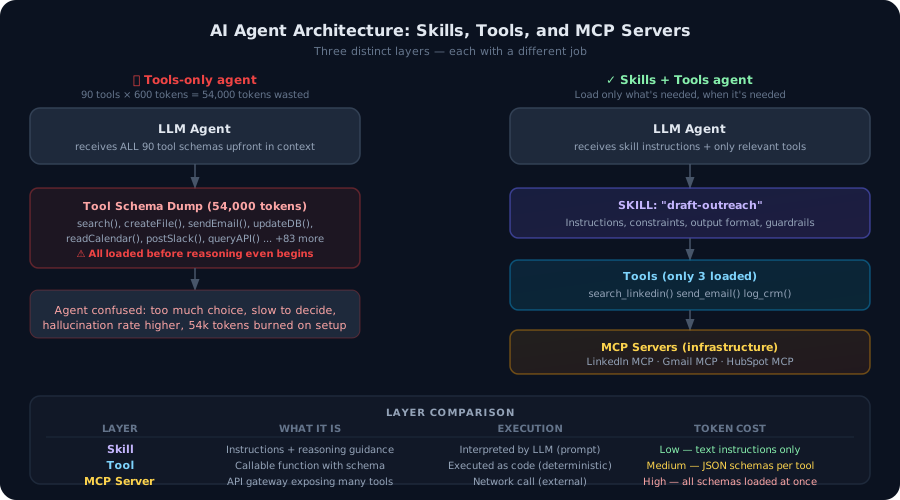
Most developers build agents with tools. That's not enough. Here's the architectural difference between agent tools and agent skills — and why getting this wrong burns tokens, degrades accuracy, and makes your agents brittle in production.

The economics that made your demo cheap fall apart at scale. Context window bloat, wrong model for the task, and zero caching are costing you 60–90% more than necessary. Here are five levers — with Node.js code — to cut your LLM bill without touching your output quality.
Ship AI features that survive real traffic
Start from the failure modes, choose the smallest architecture that holds up, and instrument the path before you scale it.