

AI Agent Development Services: How to Build Agents That Actually Work in Production
Most teams that start building an AI agent get a convincing demo in a day or two. The agent reads a request, calls a couple of tools, and produces a sensible answer. Then it meets real data, an API that times out, a user who phrases things strangely, and a permission nobody thought about.
That gap between a demo and a system you can trust with real work is what AI agent development services are for. This guide explains what those services should cover, how the work moves from idea to production, what a production-ready architecture looks like, and how to judge whether a custom agent is the right call at all.
The short version: an agent is a language model wrapped in software engineering. The model reasons. Everything that makes it dependable (integrations, validation, permissions, testing, monitoring) is ordinary engineering that somebody has to do properly.
What Are AI Agent Development Services?
AI agent development services are the engineering work required to design, build, deploy, and maintain AI agents that complete multi-step tasks inside a business. That includes the model and prompts, but also the tools the agent can call, the data it can read, the rules it must follow, and the monitoring that tells you when something goes wrong.
You will also see the same work described as agentic AI development services or AI agents development services. The wording varies; the scope is the same.
What an AI Agent Actually Does
An agent takes a goal, decides what to do next, uses a tool, looks at the result, and repeats until the goal is met or it needs help. A support agent might read a ticket, look up the customer in your CRM, check order status in your ERP, draft a reply, and escalate if the refund exceeds a limit.
AI Agents vs Traditional Automation
Traditional automation follows fixed rules: if this, then that. It is fast and predictable, but it breaks when the input does not match the expected shape. An agent can interpret messy input and choose among paths, at the cost of being less predictable. I covered the wider picture in what AI agent workflow automation is.
AI Agents vs AI Chatbots
A chatbot responds. An agent acts. If the system only answers questions, you likely need a chatbot, and AI chatbot development services are a better fit. If it must change something in another system, you are in agent territory and the risk profile changes with it.
AI Agents vs Simple LLM Applications
A single model call that summarizes a document is an LLM feature, not an agent. There is no loop, no tool choice, and no multi-step decision. Calling it an agent adds complexity without adding value.
When a Business Actually Needs an AI Agent
You probably need an agent when:
- The task has several steps that depend on earlier results
- Inputs are unstructured or vary too much for fixed rules
- The work touches more than one system
- A wrong action is reviewable or reversible
If none of that is true, start with simpler automation. For a side-by-side view, see AI agents vs chatbots vs automations.
What Is Included in AI Agent Development Services?
A complete engagement covers far more than connecting a model to a few APIs.
AI Agent Strategy and Use-Case Discovery
Choosing the right first workflow matters more than any technology choice. Good discovery maps the current process, measures how long it takes, and finds the step where judgment is genuinely needed.
Agent Architecture Design
This defines how the agent is structured: a single agent or several, how control flows, where deterministic code takes over, and where a person approves.
LLM and Model Selection
Different tasks need different models. A cheaper, faster model may handle classification while a stronger one handles planning. Selection balances accuracy, latency, cost, and data-handling terms.
Tool and API Integration
Tools are how an agent acts. Each one needs a clear contract, input validation, error handling, and a defined failure behavior.
Knowledge and Data Integration
Agents often need your documents, records, or knowledge base. That means retrieval, access control, and keeping the data fresh. If answers are wrong in production, retrieval is a common cause; see why RAG demos fail in production.
Workflow and Decision Logic
Which steps are fixed, which are left to the model, and what happens on each outcome. Anything that must always happen the same way should be code, not a prompt.
Memory and Context Management
What the agent remembers within a task and across tasks, and what it must forget. Poor context handling is a quiet source of cost and error.
Authentication and Permissions
Which identity the agent acts as, what it may read, and what it may change.
Testing and Evaluation
A repeatable way to measure behavior before and after every change.
Production Deployment
Hosting, scaling, secrets management, rollback, and environment separation.
Monitoring and Optimization
Logs, traces, cost tracking, and alerts, so you find problems before users do.
How AI Agent Development Works From Idea to Production
Here is the sequence I follow for production agents.
Step 1: Identify the Business Problem
Start with the outcome and the cost of the current process, not with "we want an agent." Write down what is slow, error-prone, or expensive today.
Step 2: Define the Agent's Responsibilities
State what the agent may decide, what it may do, and what it must never do. A narrow job description makes the agent easier to test and safer to run.
Step 3: Identify Tools and Data Sources
List every system the agent must read from or write to. Each is a dependency with its own authentication, limits, and failure modes.
Step 4: Design the Agent Architecture
Decide the orchestration pattern, where validation lives, and how a human steps in. Sketch the failure paths before the happy path.
Step 5: Build the Initial Prototype
Build the smallest version that completes one real task end to end. This is where you learn whether the idea works at all.
Step 6: Connect APIs and Business Systems
Replace mocks with real integrations. This step usually takes longer than the agent logic itself.
Step 7: Add Guardrails and Permissions
Add input and output validation, least-privilege access, spending limits, and approval gates for risky actions.
Step 8: Test the Agent With Real Scenarios
Use real, messy examples, including the ones that embarrass you. Measure, fix, and measure again.
Step 9: Deploy the Agent
Release gradually. Start with the agent suggesting actions for a person to approve, then widen its autonomy as the data supports it.
Step 10: Monitor and Improve Performance
Review traces, failures, and cost every week at first. Production behavior always differs from test behavior.
AI Agent Architecture for Production Applications
A production agent is a set of layers, each with a clear job.
User Interface or Application Layer
Where requests come from: a chat window, a web app, an email inbox, a webhook, or a scheduled job.
Agent Orchestration Layer
The control loop. It decides when to call the model, when to call a tool, when to stop, and when to escalate. Frameworks help, but the logic should remain readable and testable.
LLM Layer
The reasoning engine. Keep it swappable so you can change models without rewriting the system.
Tool and Function Calling
The model proposes a call; your code validates and executes it. Never let model output run directly against a system without validation.
Knowledge and Retrieval Layer
Search over your documents or data, with access control applied before results reach the model.
Memory Layer
Short-term context for the current task and, where needed, durable memory with clear retention rules.
Business Logic and Validation
Deterministic checks: totals add up, required fields exist, amounts are within limits, the action is allowed for this user.
Authentication and Authorization
Who the agent acts as and what that identity is allowed to do.
Monitoring and Observability
Structured logs of every model call, tool call, decision, and cost.
Suggested Architecture Flow
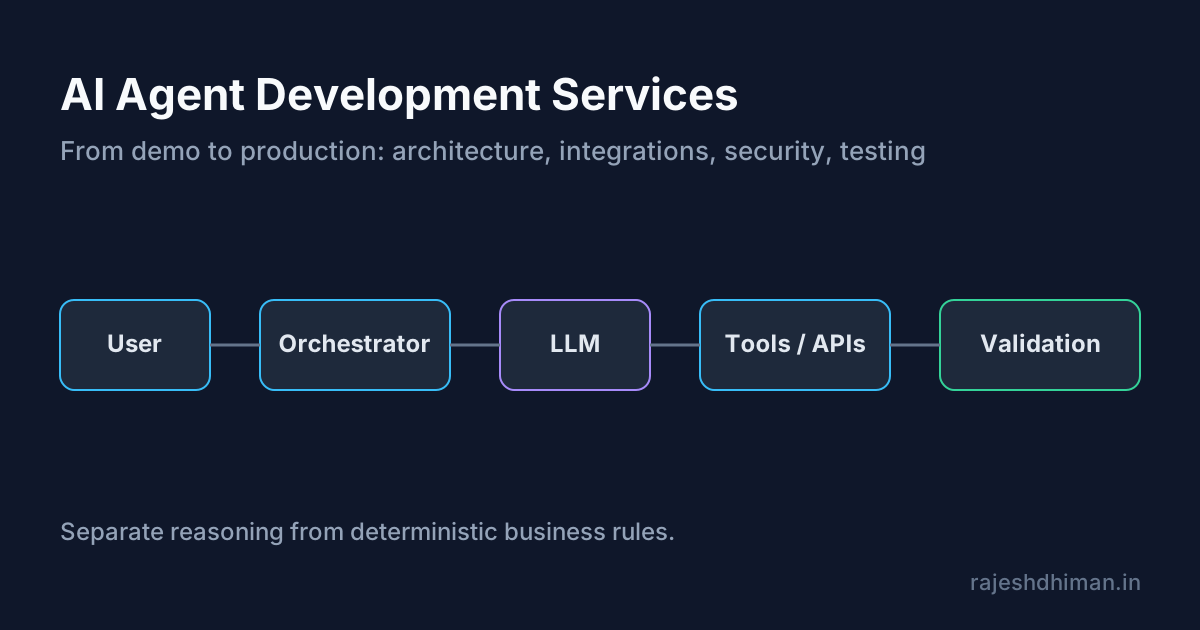
User → Application → Agent Orchestrator → LLM → Tools/APIs → Business Systems → Validation → Response
The principle that holds this together: separate reasoning from deterministic business rules wherever you can. Let the model interpret and plan. Let code enforce the rules.
What Makes an AI Agent Production-Ready?
A production agent does not just give good answers. It performs actions safely and consistently when APIs fail, data is incomplete, tools return surprises, and the model gets something wrong.
Reliable Tool Calling
The agent picks the right tool with the right arguments, and malformed calls are caught and corrected, not executed.
Predictable Workflow Execution
The same input leads to the same class of outcome. Where behavior must vary, the variation is bounded.
Error Handling and Recovery
Retry what is safe to retry, fall back when there is a fallback, and stop when there is not.
Human Approval for High-Risk Actions
Payments, deletions, external messages, and contract changes need a person in the loop until the track record justifies otherwise. For an applied example, see how to choose an AI engineer to build agents with human fallbacks.
Authentication and Access Controls
Every action is attributable and limited to what the agent needs.
Data Validation
Outputs are checked against schemas and business rules before they reach another system.
Rate Limits and API Failure Handling
Backoff, timeouts, and circuit breakers so one slow dependency does not take everything down.
Logging and Observability
You can reconstruct why the agent did what it did.
Cost Controls
Per-task budgets, caching, and model routing, so a loop bug does not become a bill. See how to control LLM cost in production.
Performance Monitoring
Latency, success rate, and quality tracked over time, not just at launch.
What Business Problems Can AI Agents Solve?
Focus on workflows and outcomes, not on a catalog of agent types.
Customer Support Agents
Triage tickets, pull account context, draft replies, and escalate by policy.
Sales and Lead Qualification Agents
Enrich leads, score fit, route to the right owner, and draft first-touch messages.
Research Agents
Gather and synthesize information from defined sources with citations a person can check.
Internal Knowledge Agents
Answer employee questions from policies and documentation, respecting permissions.
Data Analysis Agents
Query approved datasets and explain results, with read-only access by default.
Document Processing Agents
Extract, classify, and validate fields from invoices, contracts, and forms. A closer look is in AI document processing for business.
Operations and Workflow Agents
Move work between systems, chase approvals, and update records.
Software Development Agents
Assist with code review, test generation, and repetitive engineering chores, under developer oversight.
Reporting and Business Intelligence Agents
Assemble recurring reports from several sources and flag anomalies.
Custom AI Agent Development vs Off-the-Shelf AI Tools
Many teams should not build a custom agent. The honest comparison:
When an Existing AI Tool Is Enough
If the task is generic, the data is not sensitive, and a configurable product already does it, buy it. You save time and maintenance.
When Custom Development Makes Sense
Custom work pays off when the tool cannot reach your systems or data, cannot meet your security needs, or cannot express your workflow.
- Business-specific data requirements. The agent needs your records and context, with your access rules.
- Custom API integrations. Your internal or legacy systems have no ready connector.
- Security and access requirements. You need specific controls, residency, or audit trails.
- Complex multi-step workflows. The process branches in ways generic tools cannot model.
- Ownership and long-term control. You want to own the code, the data, and the roadmap.
- Scalability requirements. Volume or latency needs exceed what a hosted tool supports.
Agentic AI Development Services for Business Workflows
"Agentic" describes how much freedom the system has, not a separate technology.
What Makes a System Agentic?
It plans, chooses tools, and adapts to results instead of following a fixed script.
Multi-Step Reasoning and Execution
The system breaks a goal into steps and carries them out in order, revising as it learns.
Tool Selection
It chooses among available tools. The more tools you expose, the more likely it is to choose wrongly, so keep the set small.
Dynamic Workflow Decisions
The path through the workflow is decided at run time within limits you set.
Agent Memory and Context
It carries relevant information between steps without bloating the context.
Human-in-the-Loop Workflows
People approve or correct at defined points.
Multiple Agents Working Together
Several specialized agents can coordinate, though most first projects do not need this. If you are weighing it, read when to split work across multiple agents.
When Agentic AI Is Better Than Traditional Automation
When the next step depends on interpretation, not on a rule. Otherwise, traditional automation wins on cost and predictability.
How AI Agents Integrate With Existing Business Systems
An agent is only as useful as the systems it can reach.
- CRM integration: read and update contacts, deals, and activities
- ERP integration: orders, inventory, invoices
- Helpdesk and support systems: tickets, macros, customer history
- Databases: scoped queries, ideally read-only
- Internal APIs: wrapped as well-defined tools
- SaaS applications: through official APIs and webhooks
- Email and communication platforms: read, draft, and send with approval
- Document management systems: retrieve and store files
- Business intelligence platforms: pull metrics and push summaries
Why API Integration Is Often Harder Than Building the AI Layer
The model part is a few hundred lines. The integration part is where projects slow down, because real systems bring:
- Authentication schemes and token refresh
- API limitations and undocumented behavior
- Rate limits
- Inconsistent data formats
- Permission models that do not map cleanly to the agent
- Failed and partially completed requests
- Legacy systems with no modern API
- Webhooks that arrive late, twice, or out of order
- Data that needs validating before anyone trusts it
This is what separates production engineering from AI experimentation.
How to Build Secure AI Agents
Security is part of the design, not a final review.
Authentication and Authorization
Give the agent its own identity, never a shared admin account.
Role-Based Agent Permissions
Scope access by task and by user. An agent acting for a support rep should not see finance data.
Protecting Sensitive Business Data
Minimize what is sent to the model, redact where possible, and agree retention terms with providers.
Prompt Injection Risks
Text the agent reads, such as emails, web pages, and documents, can contain instructions aimed at the model. Treat all retrieved content as untrusted.
Tool and API Security
Validate every argument, allowlist destinations, and never pass raw model output to a shell or a query.
Data Leakage Prevention
Check outputs for sensitive data before they leave the system.
Audit Logs
Record every action with who, what, when, and why.
Human Approval Workflows
Gate risky actions behind a person.
Limiting High-Risk Agent Actions
Cap spend, volume, and blast radius. A good default is that the agent can propose anything and execute only what is low-risk. The full checklist is in security requirements for deploying autonomous AI agents.
How to Test and Evaluate AI Agents Before Production
You cannot judge an agent by reading a few good transcripts.
- Define expected behavior. Write down what a correct outcome looks like.
- Create realistic test scenarios. Use real cases, including ugly ones.
- Test tool-calling accuracy. Check that the right tool is chosen with the right arguments.
- Test incorrect user inputs. Typos, missing details, contradictions.
- Test API failures. Timeouts, errors, empty responses.
- Test hallucinations. Check for unsupported claims.
- Test security boundaries. Try to make it exceed its permissions.
- Measure task completion rates.
- Evaluate cost per task.
- Monitor human intervention rates.
Suggested KPI Table
| KPI | What It Measures |
|---|---|
| Task completion rate | Percentage of tasks successfully completed |
| Tool-call accuracy | Correctness of tool and API selection |
| Error rate | Frequency of failed workflows |
| Human intervention rate | How often a person must step in |
| Response time | Agent execution speed |
| Cost per task | AI and infrastructure cost |
| Hallucination rate | Frequency of unsupported outputs |
| Recovery rate | Ability to recover from failures |
Once the agent is live, these same numbers feed your ROI case. See what to measure after implementing AI workflow automation.
Common Reasons AI Agents Fail in Production
These failures are predictable.
- Building a demo instead of a production system. Nothing was designed for failure.
- Giving agents too many tools. Tool selection accuracy drops as the list grows.
- Poor prompt and context design. Overloaded context hides what matters.
- Missing validation. Bad output flows straight into a business system.
- Weak permission controls. The agent can do far more than it should.
- No error recovery. One failed call ends the run, or worse, corrupts data.
- Ignoring API failures. The agent assumes every call succeeds.
- No monitoring. Problems are found by customers.
- Uncontrolled LLM costs. A loop or a long context quietly multiplies spend.
- Lack of human oversight. Nobody reviews what the agent does until something breaks.
When an agent project has already stalled, the question changes from "how do we build it" to "fix, rebuild, or stop." I wrote about that in your AI project is stalled: fix, rebuild, or kill.
How Much Do AI Agent Development Services Cost?
I will not put a made-up number here, because any fixed price without scope is a guess. What I can do is show you what drives cost.
What Moves the Price
- Number of agents
- Workflow complexity
- Number of integrations
- Data requirements
- Model selection
- Security requirements
- Infrastructure
- Testing requirements
- Expected usage
- Ongoing maintenance
Cost by Type of Engagement
- Proof-of-concept development: the cheapest way to learn whether the idea holds up.
- Single-agent applications: one agent, a handful of tools.
- Workflow automation agents: an agent embedded in an existing process.
- Custom business agents: deeper integrations and tighter controls.
- Multi-agent systems: more coordination, more testing, more to monitor.
- Enterprise AI agent platforms: governance, access control, and scale.
Costs People Forget
- API integration costs: often the largest share of effort.
- LLM usage costs: scale with volume and context length.
- Infrastructure costs: hosting, queues, storage, observability.
- Monitoring and maintenance: an ongoing line item, not a one-off.
For a framework to turn those inputs into a payback estimate, see how to calculate ROI for governed AI workflows.
How to Find Reliable AI Agent Development Services
If you are hiring, these are the questions that separate real engineering from demos.
- Look for production experience. Ask what is running in production today.
- Review previous AI projects. Ask what went wrong and how it was fixed.
- Ask about architecture. They should explain it plainly and draw it.
- Evaluate API integration experience. This is where schedules slip.
- Ask how agents are tested. "We try it out" is not an answer.
- Check security practices. Permissions, injection defenses, audit logs.
- Understand monitoring capabilities. What will you see after launch?
- Ask about post-launch support. Who fixes it at 2 a.m. on a Monday?
- Review communication and documentation. You will depend on both.
- Evaluate technical ownership. Who owns the code, prompts, and data?
If you are searching for what to look for when hiring AI agent development services, or how to find reliable partners as a startup, this list is the core of it. A related checklist for individual engineers is in how to choose an AI engineer for agents with human fallbacks.
AI Agent Development Services for Startups
Startups have less money and less time, which is a reason to be narrower.
- Start with one high-value workflow. Pick the one that hurts most.
- Validate the business case. Estimate hours saved or revenue protected before building.
- Build a focused MVP. One agent, a few tools, a clear success measure. See how to build and launch an AI MVP.
- Avoid overengineering the first version. No multi-agent system to solve a single-agent problem.
- Connect only necessary tools. Every tool adds risk and cost.
- Measure ROI early. Decide the metric before launch.
- Design for future scalability. Keep interfaces clean so you can grow without a rewrite.
The aim is to decide what to build first, not to put an agent everywhere.
AI Agent Development vs Traditional Workflow Automation
| Approach | Best For |
|---|---|
| Traditional automation | Predictable, rule-based workflows |
| AI automation | Workflows requiring AI interpretation |
| AI agents | Dynamic multi-step tasks |
| Agentic AI | Complex workflows requiring reasoning and tool selection |
- Rule-based automation handles fixed steps cheaply and predictably.
- AI-powered automation adds interpretation at specific points, such as classifying or extracting.
- AI agents choose their own steps toward a goal.
- Agentic AI systems combine planning, tools, memory, and sometimes several agents.
When Traditional Automation Is Still Better
If you can write the rules, write the rules. It will be faster, cheaper, and easier to debug. Reach for an agent only where rules stop working.
How AWS Professional Service Agents Can Accelerate AI Application Development
This is a specific example of agents assisting engineering work, so it is worth a short, factual look.
What Professional Service Agents Are
AWS has described AWS Professional Service Agents as AI agents used inside AWS Professional Services engagements, with a central delivery agent acting as the main technical interface for a project. They are used through AWS Professional Services or its partners, not as a standalone product you set up yourself. See the AWS announcement for the official description.
How Agents Can Assist Development Teams
Per AWS, the agents can turn requirements such as documents, diagrams, and meeting notes into design specifications and implementation plans, and support migration and modernization planning.
Automating Repetitive Development Tasks
AWS also describes generating code, automating testing, and preparing deployment packages, the kind of repetitive work that agents handle well.
Accelerating Application Workflows
The pattern is useful beyond AWS: agents shorten the path from requirements to a first working draft, which people then refine.
Where Developer Oversight Is Still Required
AWS itself states that human consultants stay involved to guide strategy, make key decisions, and oversee the agents' work. That matches what I see in practice. Agents speed up drafting; engineers still own architecture, review, and accountability.
When Should a Business Hire AI Agent Development Services?
Consider outside help when:
- The workflow is too complex for basic automation. Rules keep breaking.
- Employees spend significant time on repetitive decisions. The volume justifies the build.
- Multiple business systems need to work together. Integration is the hard part and benefits from experience.
- The business has proprietary data. Off-the-shelf tools cannot use it safely.
- Existing AI tools cannot meet requirements. You have tried and hit a wall.
- Security and compliance require custom controls. Generic tools cannot provide them.
- The agent needs to take real business actions. Writing to systems raises the stakes.
Professional AI Agent Development Services
At Eunix Tech, this is the work I do with clients, across the stages above:
- AI agent strategy and architecture: choosing the right workflow and design
- Custom agent development: agents built around your processes and data
- Agentic AI application development: multi-step systems with real controls
- API and business system integration: the connection work that makes agents useful
- AI workflow automation: combining rules and AI where each fits
- AI security and guardrails: permissions, validation, approval flows
- Testing and evaluation: repeatable measurement before launch
- Production deployment: safe, staged releases
- Monitoring and optimization: keeping the agent reliable after launch
If you are evaluating an AI agent idea, an existing workflow, or a production system that is not behaving, you can book a technical consultation and we will look at the architecture together.
Conclusion: Building AI Agents That Work Beyond the Demo
Successful AI agents are not chat interfaces on top of a language model. They are software systems: integrations, architecture, testing, security, monitoring, and ongoing tuning, with a model at the center.
- Start with a real business problem. A measurable pain beats a technology goal.
- Build around the workflow. Fit the agent to how the work actually flows.
- Integrate agents with reliable systems. Clean APIs and validation first.
- Add security and guardrails from the beginning. Retrofitting is painful.
- Test with real-world scenarios. Demos hide the failures that matter.
- Monitor performance after launch. Production keeps changing.
If you are evaluating AI agent development services, struggling with an existing implementation, or trying to take an AI workflow into production, book a technical consultation.
Frequently asked questions
What are AI agent development services?
AI agent development services cover the design, build, integration, testing, deployment, and ongoing monitoring of AI agents that reason over a goal, call tools and APIs, use business data, and complete multi-step tasks. The work is mostly software engineering around a language model, not prompt writing alone.
How much do AI agent development services cost?
There is no honest fixed price. Cost depends on the number of agents, the complexity of the workflow, how many systems must be integrated, data requirements, model choice, security requirements, testing depth, expected usage, and ongoing maintenance. A scoped proof of concept costs far less than a multi-agent enterprise platform.
What is included in custom AI agent development?
Use-case discovery, agent architecture, model selection, tool and API integration, knowledge and data access, workflow and decision logic, memory and context handling, authentication and permissions, evaluation and testing, production deployment, and monitoring after launch.
What is the difference between AI agents and chatbots?
A chatbot answers questions in a conversation. An agent pursues a goal: it decides which tools to use, takes actions in other systems, checks the results, and continues until the task is done or a person needs to step in.
What is agentic AI development?
Agentic AI development is building systems where a model plans steps, selects tools, updates its plan from the results, and acts with some autonomy inside limits you define. It adds orchestration, permissions, validation, and human approval around the model.
When should a business use an AI agent?
When a workflow needs judgment across several steps or systems, the inputs vary too much for fixed rules, and an error is recoverable or reviewable. If the process is fully predictable, ordinary automation is cheaper and more reliable.
How long does it take to develop an AI agent?
A narrowly scoped single-agent prototype can be working in days to a few weeks. Production readiness takes longer because integrations, permissions, evaluation, error handling, and monitoring are where most of the effort goes. Timelines grow with the number of systems involved.
Can AI agents integrate with existing business software?
Yes. Agents connect to CRMs, ERPs, helpdesks, databases, internal APIs, email, and document systems through APIs, webhooks, and function calling. Authentication, rate limits, data formats, and permission models are usually harder than the AI layer itself.
Can AI agents work with APIs and databases?
Yes, through tool or function calling. The agent chooses a tool, your code validates the arguments and executes the call, and the result goes back to the model. Database access should be scoped to the minimum required, preferably read-only unless a write is explicitly approved.
How are AI agents tested before production?
With realistic task scenarios, tool-calling accuracy checks, bad-input and API-failure tests, hallucination checks, and security boundary tests. Teams track task completion rate, error rate, human intervention rate, latency, and cost per task.
How do you secure an AI agent?
Give the agent its own identity and the least privilege it needs, keep secrets out of prompts, validate every tool call, defend against prompt injection, log every action, and require human approval for high-risk actions such as payments, deletions, or external messages.
How do AI agents handle errors?
Well-built agents retry safe operations, fall back to alternative paths, stop and escalate to a person when they are uncertain, and never guess when a tool fails. Error handling lives mostly in the orchestration code, not in the prompt.
Can AI agents replace traditional workflow automation?
Not entirely. Rule-based automation is still better for predictable workflows. Agents add value where the input is unstructured or the next step depends on judgment. Many production systems combine both.
What is the difference between custom AI agents and off-the-shelf AI tools?
Off-the-shelf tools are quick to adopt and fine for common tasks. Custom agents make sense when you need your own data, custom integrations, specific security controls, multi-step workflows, or long-term ownership of the system.
Are AI agents suitable for startups?
Yes, if the first agent is narrow. Pick one high-value workflow, build a focused MVP, connect only the tools it needs, and measure return early. Overbuilding a general-purpose agent is the common startup mistake.
How do I choose reliable AI agent development services?
Look for production experience, ask to see architecture and past projects, probe integration experience, ask how agents are tested and secured, and confirm what monitoring and post-launch support are included.
Can AI agents be deployed into existing applications?
Yes. An agent can sit behind an existing interface, run as a background service triggered by events, or be exposed as an internal API your applications call.
How do businesses measure AI agent performance?
With task completion rate, tool-call accuracy, error rate, human intervention rate, response time, cost per task, hallucination rate, and recovery rate, tracked against a baseline of how the work was done before.
Do AI agents require ongoing maintenance?
Yes. Models change, APIs change, and real-world inputs drift. Plan for monitoring, evaluation reruns, prompt and tool updates, cost review, and security patching after launch.
How do AI agent development services handle data security?
By scoping data access per role, encrypting data in transit and at rest, limiting what is sent to model providers, redacting sensitive fields where possible, keeping audit logs, and agreeing data retention rules before real data is used.
Stuck on a web app, automation, or AI project?
Fifteen minutes, free. You describe the blocker, I tell you what I would fix first. No deck, no pitch — and if I am not the right fit, I will say so.
Book Your Free 15-Min Strategy CallRelated to: AI Agent Development Services: How to Build Agents That Actually Work in ProductionIf you found this article helpful, consider buying me a coffee to support more content like this.
Related Articles
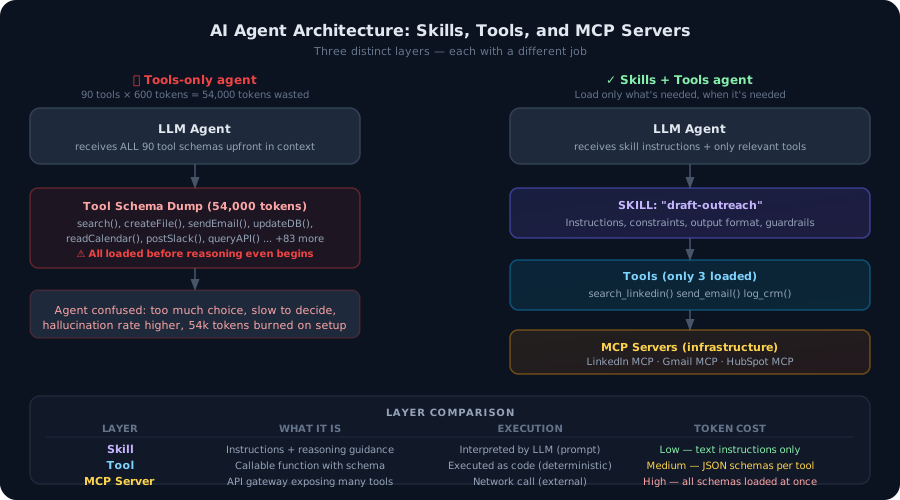
Most developers build agents with tools. That's not enough. Here's the architectural difference between agent tools and agent skills — and why getting this wrong burns tokens, degrades accuracy, and makes your agents brittle in production.
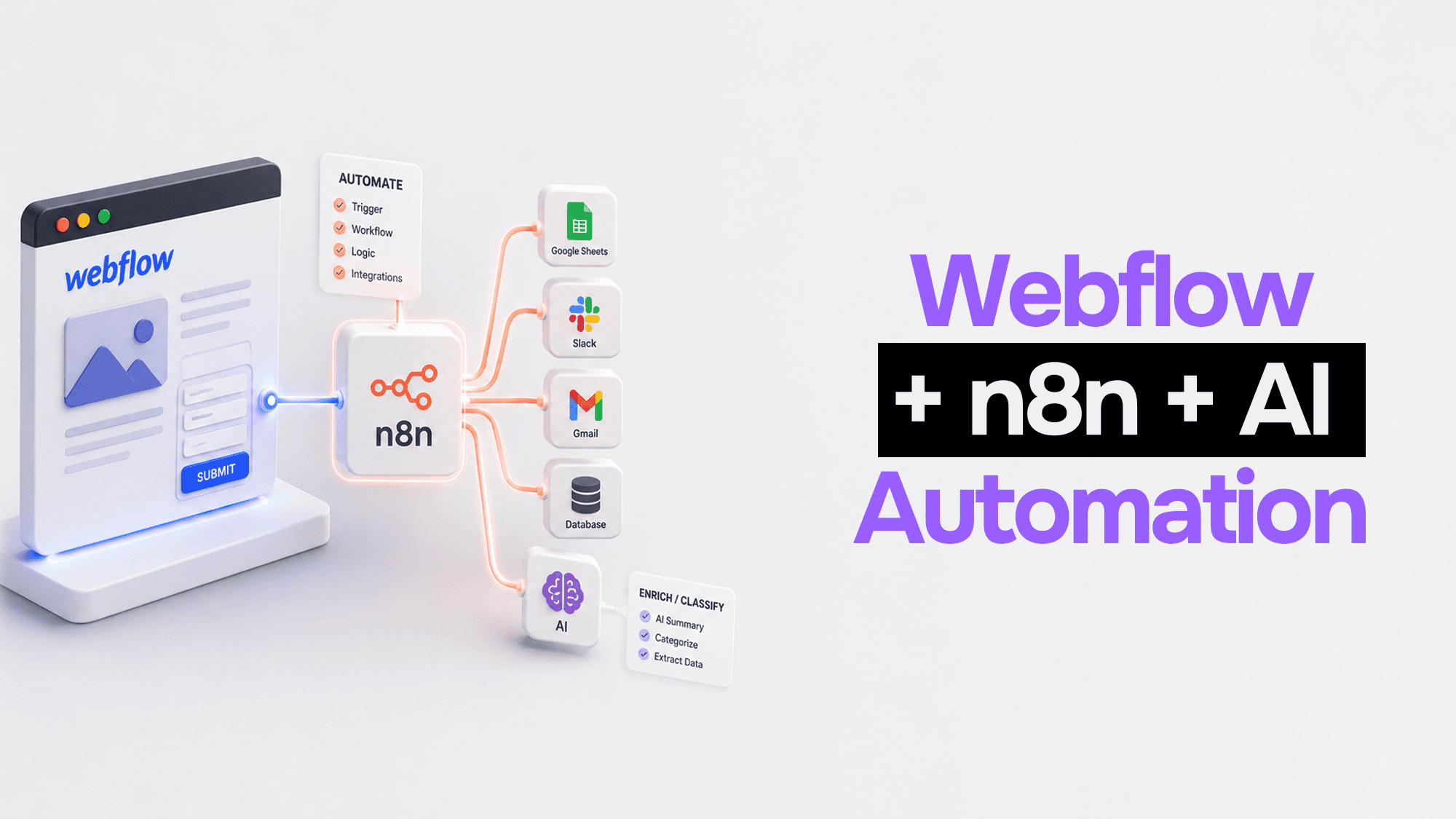
Webflow handles your frontend beautifully. n8n handles the logic. Claude handles the intelligence. Here's how to wire them together into automation pipelines that actually work.
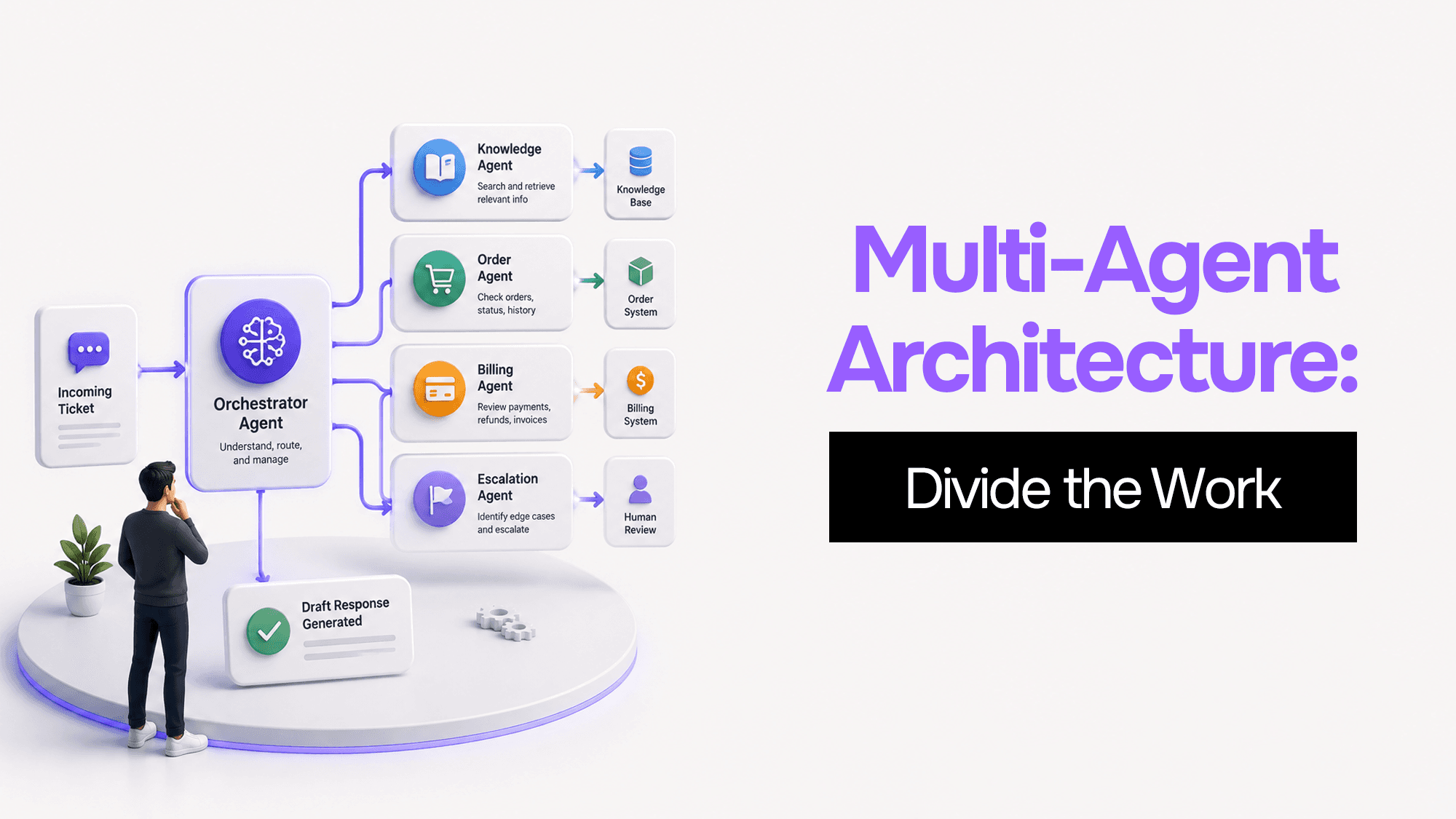
You built one AI agent and it worked. Then it got slower, started forgetting things, and ended up with access to databases it shouldn't touch. Here's what's actually happening — and four coordination patterns to fix it.
Stuck on a web app, automation, or AI project?
Fifteen minutes, free. You describe the blocker, I tell you what I would fix first. No deck, no pitch — and if I am not the right fit, I will say so.
Book Your Free 15-Min Strategy CallRelated to: AI Agent Development Services: How to Build Agents That Actually Work in Production